Tell AI just 4 things — who's reading it, what you want them to do, the tone, and the facts — and it will draft that hard email you've been staring at. Full guide: #TechTips
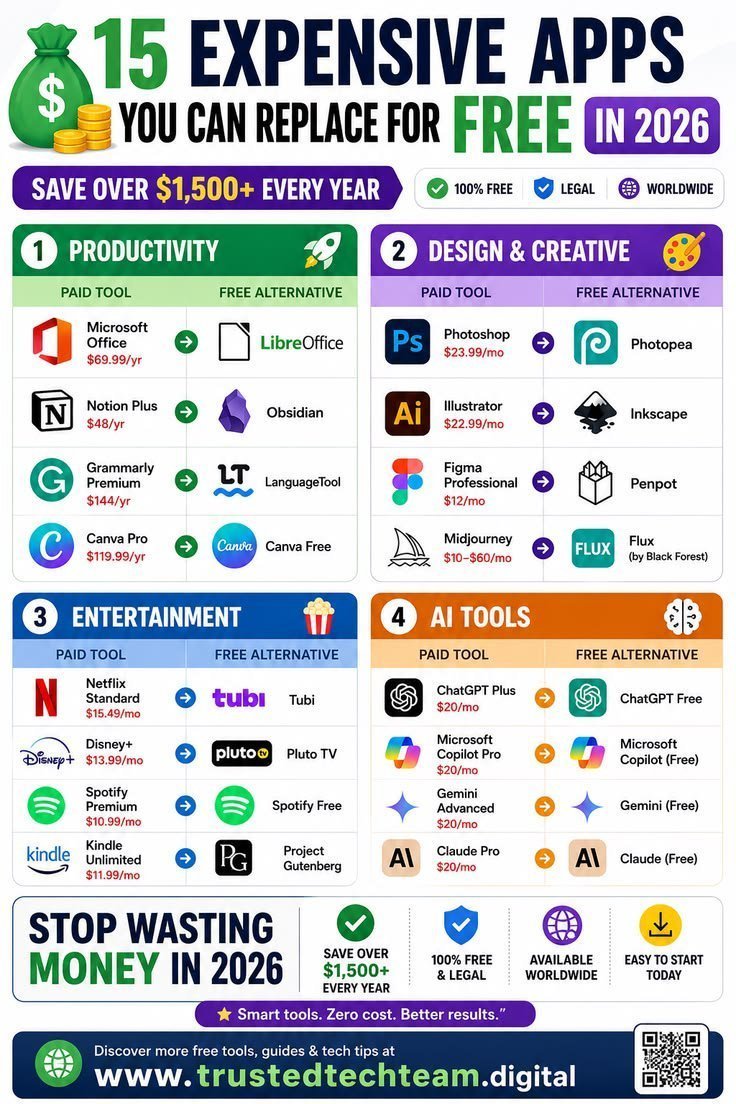
Stop burning cash on monthly subscriptions! 💸
Here are 15 powerful, free alternatives to your favorite paid apps that can save you over $1,500 every single year.
Check out the list below and start optimizing your budget for 2026. 👇
#TechTips#MoneySavingTips#Productivity
How many tabs have you lost forever after closing the wrong one by accident? Ctrl+Shift+T brings them right back — how many tabs do you have open right now? Full guide: #TechTips
Skip public Wi-Fi for banking or shopping. Turn on your phone's hotspot instead: it's your own private connection, and most plans include it. Save free public Wi-Fi for casual browsing. 📡 #CyberSecurity#TechTips
Set up Find My (iPhone) or Find Hub (Android) today, before you need it. If your phone is lost or stolen, you can locate it, lock it, or erase it from any browser. Two minutes now can save a big headache later. 📍 #TechTips#PhoneSecurity
Small tweaks, big impact! 🪛 Guitar tech Carl Lewis is here to show you how to adjust your truss rod for better playability and feel. What tips do you want to see next? #TechTips
Learn more about the Player II Modified Series:
Don't mistake a mitigation for a permanent fix. Always read vendor advisories closely, implement the temporary workaround, and remember that patching is the only real solution. Never skip validating functionality after making security changes. #CyberSecurity#TechTips
Would you trust a home alarm that learns your daily routine? It can now tell your normal patterns from something suspicious — smart or a little too smart? Full guide: #TechTips
Tech tip: hide message previews on your lock screen. Login codes and private texts shouldn't pop up for anyone who glances at your phone. iPhone: Settings > Notifications. Android: Settings > Notifications > Lock screen. 🔒 #TechTips#Privacy
Editing a configuration file is only half the battle. If you don't reload the service, those changes stay dormant. Always restart the process to apply your new settings and verify the result. #WebDev#TechTips
Networking 601, Part 142: Precision Time Protocol (PTP)
Patient technology help in Oklahoma. Free 15-minute phone consultation: call or text 405-922-9375. #46Networks#TechTips
Your phone is hiding useful tricks from you — and there are over 365 of them most people never find. iPhone, Android and smart home shortcuts, in plain English. Full guide: #TechTips
Networking 601, Part 138: IPv6 Security
Patient technology help in Oklahoma. Free 15-minute phone consultation: call or text 405-922-9375. #46Networks#TechTips
Build Tip #4: free up phone storage without deleting photos. iPhone: Settings > General > iPhone Storage > Offload Unused Apps. Android: Files by Google > Clean. Rarely used apps step aside and your data stays. Which phone are you on? 📱 #TechTips