Posty z #codebase

#codebase

Publiczne posty w X, które używają #codebase.

  1. Movez✓@0xMovez
    I just reverse-engineered Apple AirDrop with Opus 5.5 to send files between my Mac & Windows PC this is insane... drag a file onto the other computer → hop. it's there. no cloud. no account. no cable. → here's the build step by step: • step 1 → open Claude Code on Opus 5.5 in an empty folder and paste the prompt below • step 2 → Opus picks the stack: one Electron codebase that runs on macOS and Windows • step 3 → discovery: every 1.5 s each computer says "i'm here" over UDP on your local network. the other one pops up on a radar • step 4 → transfer: files stream directly between the two machines. the other side gets Accept / Decline. "always accept" for your own computers • step 5 → before any UI, Opus wrote a test: two fake devices find each other and send a folder + a 3 MB file, byte for byte • step 6 → design: Opus split the work across parallel agents. one rebuilt the iOS 17 NameDrop glow as a WebGL shader, one drew 3 icon concepts and picked the best, one built the download site • step 7 → separate reviewer agents checked every piece. one caught a shader bug that would've rendered black on the Mac. i'm on Windows, i'd never have seen it • step 8 → GitHub Actions builds the .dmg and the .exe on every release. the Mac build runs on Apple hardware in the cloud, not on my PC • step 9 → first launch on the Mac: the icon just bounced in the dock. Opus added a startup log and a fallback that forces the window open. next build opened fine one afternoon. zero lines written by me. drop it on the Mac. it lands on the PC. that's it... find full prompt below ↓ Then read the article on how to reverse-engineer anything with Opus 5.5.
    Pobierz
    Movez @0xMovez
    406463958.6K
  2. Movez✓@0xMovez
    234111.6K2M
  3. Camto✓@CamtoIke
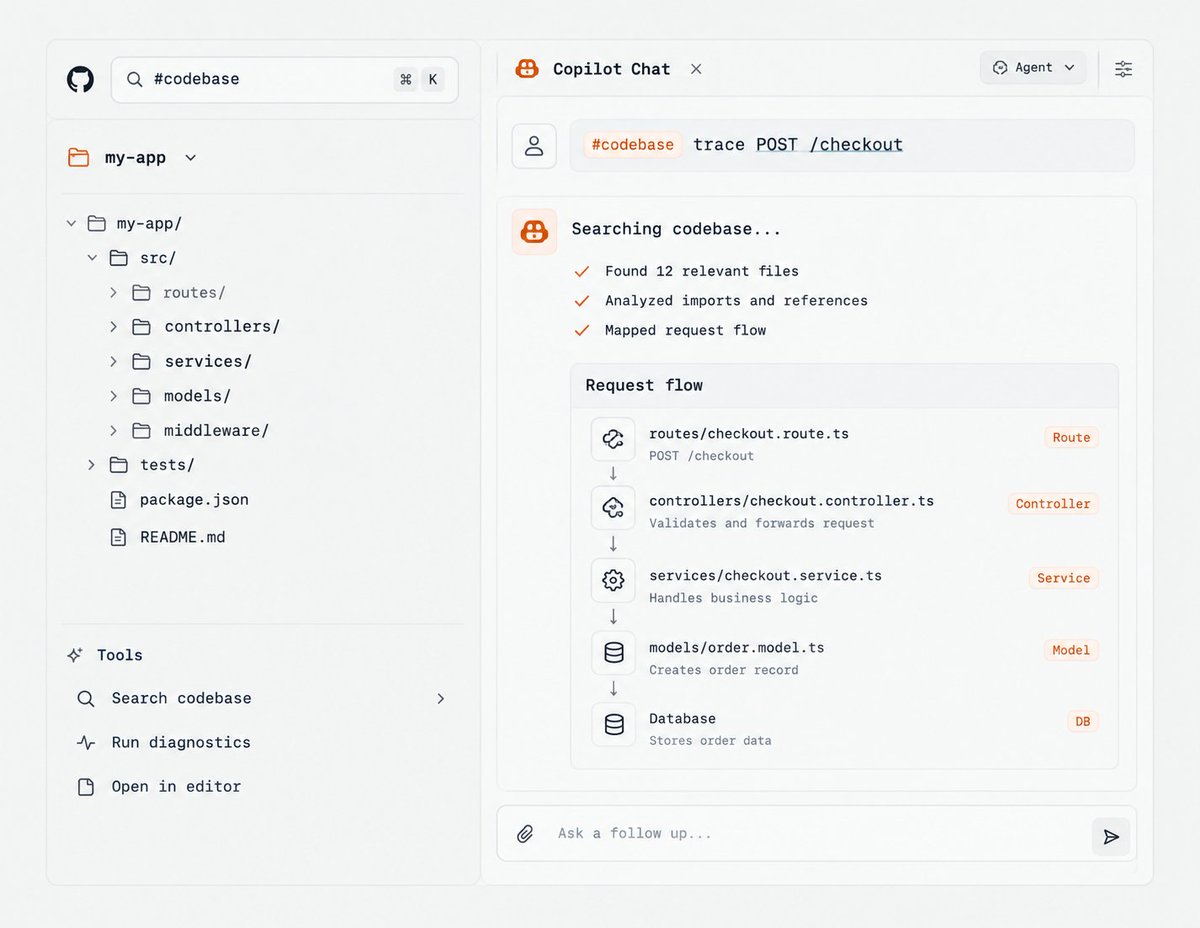
    Copilot users: stop pasting files into chat to ask how your codebase works. Try this instead: "#codebase where is auth handled, and what calls it?"
    Pobierz
    34253407
  4. lauren✓@poteto
    we will need to rebuild and rewrite much of software to adapt to a new, faster pace. code used to arrive one drop at a time. soon, if not already, code will be written as if it were a continuous stream, like a violent river twisting and turning as it pleases. this is not a new thing: big tech cos have had to deal with this with the enormous scale of their engineering teams. but now ai has brought an incredibly elastic and capable workforce wielded by every engineer. this is your problem now, and the only way to adapt is to evolve your systems so agents - even and especially the ones with little context about the right way of doing things - can thrive. make the easy thing the right thing. your codebase is becoming organic architecture. agent contributions grow around the constraints and guardrails you’ve designed. good software engineering matters even more now! and no, the continuous stream of code is not something you have to watch helplessly. be more ambitious and design systems, frameworks, and languages to control the chaos. the time for mourning coding is long over
    Joseph Cox @josephfcox
    Here is Proton CTO's AI manifesto, that I obtained multiple copies of
    3144546K335K
  5. Joseph Cox✓@josephfcox
    @josephfcox
    Here is Proton CTO's AI manifesto, that I obtained multiple copies of
    Pobierz
    1594144K1.4M
  6. Harrison Chase✓@hwchase17
    A lot of content engineering challenges have pretty standard solutions, which has lead to some engineers saying agent engineering is solved/boring True to some extent, but there are a bunch of (fun) new ones emerging as agents evolve!
    2086561080.6K
  7. Visual Studio Code✓@code
    Did you see the latest @code release? 👀 ✨ Preview videos in the image carousel 📋 Copy chat responses into markdown 🔍 Troubleshoot chat problems ⚡ Updated #codebase command ...and more! See what's new →
    Pobierz
    6815886.2K
  8. dhruvieiei✓@StackDhruv
    141829724.9K
  9. Himanshu Kumar✓@codewithimanshu
    The creator of Claude Code Teaches more about vibe-coding in 30 minutes than most paid tutorials do in 10 hours. Absolutely Free. From the guy who built the tool. Save it. Watch tonight. It'll change how you build forever. You've been using Claude Code wrong for months without knowing it. This fixes that in 30 minutes. Follow @codewithimanshu for more high-signal content that actually moves your career forward. ↓ Boris runs technical staff at Anthropic. He built Claude Code. He just gave away the entire playbook. This is the talk that separates people making $10K/month with AI coding from people still Googling "how to fix this error." Here's everything he covers in 30 minutes. Follow @codewithimanshu, I break down a video like this. ↓ Installation and setup the right way. Not the wrong way you did it. `npm install` to get Claude Code running. `terminal setup` to enable Shift+Enter for new lines and themes. GitHub app integration to @-mention Claude directly on issues and pull requests. Mac users: system-level dictation for hands-free prompting. Most people skip these steps and wonder why their Claude Code workflow feels clunky. Follow @codewithimanshu For Full Claude Code setup guides. ↓ The workflow most users miss entirely. Codebase Q&A is the real starting point. Not "write me code." Ask Claude about your codebase first. It explores locally. No indexing. No data upload. You can ask: > Why was this function written this way? > What did I ship this week? > What's the git history of this file? Understand the codebase before you touch it. That's how senior engineers think. That's how Claude Code wants to work with you. Follow @codewithimanshu for more high-signal content that actually moves your career forward. ↓ Interactive coding that actually ships. Claude uses file editing, bash commands, and file search to execute tasks in real time. Boris's rule: brainstorm and plan BEFORE you trigger code generation. Skip the planning step and you get garbage. Do the planning step and Claude ships production-ready code. This alone is the difference between "AI wrote my app" and "AI wrote an app that actually works." More ship-ready Claude prompts already posted on @codewithimanshu. ↓ Tool integration nobody uses. Custom CLI tools. MCP servers. Integrated directly into your Claude Code workflow. Claude calls your tools. Uses your data. Executes tasks across your entire stack. This is where Claude Code stops being a coding assistant and starts being a full engineering team. Follow @codewithimanshu for MCP server breakdowns every week. ↓ Iterative feedback loops. Give Claude access to your unit tests. It refines until they pass. Give Claude screenshots of your UI. It iterates until the design matches. Most people run Claude Code once and accept the first output. The best users build feedback loops that let Claude improve itself. I share the exact feedback loops I use daily. ↓ Context management: Claude MD. Place a `claude(dot)md` file in your project root. Persistent context. Shared across every session. Enterprise config for global policies across teams. This is the file that separates hobby Claude Code users from production users. I'll post my full claude(dot)md template next week. Follow me @codewithimanshu. ↓ Slash commands and memory. `/memory` to view or modify how Claude remembers instructions. Slash commands for automating complex workflows. Example: auto-labeling GitHub issues with one command. Slash command library coming soon on @codewithimanshu. ↓ Pro key bindings Boris drops at the end. Shift+Tab: auto-accept mode for edits. Saves hours. !Command: execute a bash command and pipe output into context. Escape: safely stop Claude without corrupting your session. Drag and drop images. Paste screenshots for UI implementation. Multimodal from day one. Follow me @codewithimanshu for Daily Claude Code tips. ↓ 30 minutes from the guy who built the tool. You'll learn more from this than from 50 YouTube tutorials made by people who've never shipped production code with Claude. This is where the gap gets built. People who watch it understand Claude Code at the architect level. People who skip it keep copying commands they don't understand. Save the video. Watch it tonight. Build something tomorrow. Follow @codewithimanshu for more high-signal content that actually moves your career forward.
    Pobierz
    1211241.7K
  10. Movez✓@0xMovez
    i reverse engineered my Wi-Fi router with Claude and found a f*cking scary privacy problem... my provider could see every website I looked up. in plain text. so I built an open-source app where AI agents guard my network: Claude, ChatGPT or Grok. → it runs on your Claude or ChatGPT subscription. Mac & Windows here’s the build step by step: • step 1 → open Claude Code on Opus 5.5 in an empty folder, paste the prompt below • step 2 → stack: one Electron codebase for macOS and Windows. Node does the network checks, no admin rights needed • step 3 → Opus split the build across 9 parallel agents. one built the router scanner, one the Wi-Fi + speed test, one the AI agents, one the device list, one the installers every agent got a reviewer. every reviewer got a fixer. 27 agents before I saw the first screen • step 4 → the scanner checks 12 doors: provider remote control (TR-069, port 7547), UPnP port-forwards, Telnet, SSH, plain-HTTP admin page, unencrypted DNS, Wi-Fi security, location-map opt-out • step 5 → first real scan of my network: provider sees all my DNS lookups, SSH open on the router, UPnP on, 22 neighbour networks fighting for my channel. score 77/100 • step 6 → the AI agents. they read the scan and answer “what should I fix first?” or “is anything on my network suspicious?” before anything leaves my PC, Bastion strips MAC addresses, device names, Wi-Fi names and the last part of my IP watch mode re-checks the network every 5–60 min and only wakes the agent when something changed • step 7 → no API key. Bastion talks to Claude through Claude Code and to ChatGPT through Codex, using the login I already had • step 8 → a separate security agent attacked every line of it and found 11 holes. all fixed: the CLIs run with zero tools, read-only, in an empty folder. my question goes in through stdin, so nothing can be injected into a command. it refuses to start if Codex’s shell tool is on • step 9 → real bugs only real hardware shows: my Windows is in Russian, so Opus taught the parser Russian netsh labels. Windows 11 hides Wi-Fi info until you allow Location. Cloudflare rate-limited the speed test (HTTP 429), so Opus switched to fewer, bigger requests. next run: works • step 10 → before the repo went public, Opus checked that none of my IPs, MAC addresses or network names were in the code one evening. zero lines written by me. that’s it... agents suggest, you decide. Bastion never logs in to your router, never tries a password and never changes a setting on its own Find the GitHub repo and the full prompt below ↓ Then read the article on how to reverse engineer anything with Opus 5.5 ↓
    Pobierz
    Movez @0xMovez
    6045446117K
  11. Movez✓@0xMovez
    @0xMovez
    Github: Prompt: You are building "Bastion": a free, open-source desktop app for Windows and macOS that finds the backdoors in my home Wi-Fi router, shows where my traffic goes, speeds up my Wi-Fi, and lets AI agents watch my network. Work in this empty folder. Use Opus 5.5. DESIGN FIRST, CODE SECOND 1. Before writing any code, design 4 different UI concepts as web pages (dark, premium, Apple-level polish, focus on speed + security). I'll pick one. 2. Then rebuild the chosen concept until it looks like Apple made it: real 3D (Three.js) router on the home screen, bloom + anamorphic lens flare, glass panels, Apple-style sliders with a glow that runs around the edge, a flowing ambient background behind every screen. WHAT THE APP MUST REALLY DO (no fake data, ever) - Find my router and probe it from inside the network: TR-069/CWMP (port 7547), UPnP port-forwards (read the actual mappings), Telnet, SSH, plain-HTTP admin page. - Check whether my DNS lookups are encrypted and who resolves them. - Read my Wi-Fi: channel, band, signal, security; survey neighbour networks and recommend a quieter channel. - List devices on my network and which apps on this computer talk to the internet. - Run a real speed test. - Check if my Wi-Fi name ends with _nomap and if this computer uses a private MAC address. - Score my network 0–100 and give plain-language, step-by-step fixes. - If something can't be measured from inside my network, say "unknown" and explain why. Never guess. AI AGENTS - Let me plug in Claude, ChatGPT or Grok with my own API key (stored encrypted by the OS keychain). - Also let me use my existing subscription without an API key: talk to Claude through my Claude Code login and to ChatGPT through my Codex login. - Before anything leaves my computer, strip MAC addresses, device names, Wi-Fi names and the end of my public IP. - Agents only suggest. They can never run commands, log in to my router or change a setting. SAFETY RULES - Never log in to my router and never try a password. - Shell out only with fixed arguments; my text goes in through stdin, never into a command line. - Any CLI an agent uses runs with zero tools, read-only, in an empty folder, with a timeout. HOW TO BUILD IT - One Electron codebase for macOS and Windows. Write a short internal contract first (IPC surface + data types) so modules can be built in parallel. - Split the build across parallel agents: network scanner, Wi-Fi + speed test, AI agents, 3D hero, UI kit, screens, packaging. Give every agent a reviewer and every reviewer a fixer. - Add a separate security agent that attacks every line that runs commands or sends data. - Add a design-critic agent that screenshots every screen and asks: "would Apple ship this?" If not, it goes back. - Run the scanner on my real machine and fix whatever real hardware breaks (localized OS output, OS permissions, rate limits). - Before anything goes public, check that none of my IPs, MAC addresses or network names are in the code. SHIP IT - Push to a public GitHub repo with an English README (what it does, what it does NOT do, privacy, install). - GitHub Actions builds the .dmg and .exe on every version tag. - Build a launch site on Vercel in the same design, with download buttons that always point to the latest release.
    13243.5K
  12. Burke Holland✓@burkeholland
    Do yourself a favor and do this right now... Go to VS Code (Insiders) settings and set ` true`. Include #codebase with your prompt and you get ... * Embeddings-based semantic search * Text search * Files and directories awareness * Git modified files search * Project structure awareness This _is_ the feature you're looking for.
    Pobierz
    115431333.5K
  13. Camto✓@CamtoIke
    @CamtoIke
    "#codebase" lets Copilot use your project cxt. to answer questions about the codebase, instead of limiting the question to the file you're looking at. It can help surface: → the files that define the logic → related callers and imports → configuration and middleware involved
    2616187
  14. Akash Rajagopal@akashsairaja
    Day 8 of the design-resources list series. Shipped a web chat or agent UI and now need the mobile app too? Tamagui lets one React codebase style both web and React Native, and a build-time compiler flattens much of it. 14k+ stars, MIT. Would you share UI code this way?
    Pobierz
    100
  15. Jared Zoneraich✓@imjaredz
    Introducing FrontierCode 2.0. The second generation of our home built coding model benchmark. As you can see, there are real differences in frontier model families from each lab and we still have a lot of room to improve. FrontierCode is unique because it judges code on quality not just on correctness. Design choices, interpreting user's initial prompt ambiguity, thoroughness, and integration with existing codebase. In other words it judges "how good is the code"
    Cognition @cognition
    FrontierCode 2.0 separates model tiers more clearly than FrontierCode 1.1. It also ranks them differently: on DeepSWE v1.1, Muse Wonder 1.0 and Gemini 4 Argon score highest, but on FrontierCode 2.0 they land in the middle of the pack.
    31281.3K
  16. Cognition@cognition
    @cognition
    FrontierCode 2.0 separates model tiers more clearly than FrontierCode 1.1. It also ranks them differently: on DeepSWE v1.1, Muse Wonder 1.0 and Gemini 4 Argon score highest, but on FrontierCode 2.0 they land in the middle of the pack.
    Pobierz
    8318966.1K
  17. 0xMarioNawfal✓@RoundtableSpace
    Google open-sourced the plugin thousands of its engineers use to stop AI from coding before the plan is solid. It's called the Elephant-Goldfish Model. → The Elephant: one session that knows your whole project. It drafts the design doc and writes zero code → The Goldfish: fresh agents with no memory of your chat. They read the doc cold and catch the assumptions you never wrote down → You approve the plan, then your agent builds it Skills for brainstorming, drafting, review, resolving feedback, documenting an existing codebase, and catching docs that drift from the code. Works in Claude Code and Codex: claude plugin marketplace add google/elephant-goldfish-model claude plugin install egm@egm
    411715449.2K
  18. Replit ⠕✓@Replit
    Now anyone can now bring their ideas into the company codebase on Replit. Replit Cloud Agents can turn natural language into a tested pull request, and engineers still approve the final code before it ships. Our own design team used Replit to safely ship over 250k lines of code in the last 6 months, reviewed and approved by engineers.
    262512337.9K
  19. Aibek Yegemberdin✓@aibek_design
    You can now use Wonder directly in Codex! Design with the full context of your codebase on a fully editable canvas. So many new workflows are being unlocked with this!
    Wonder @usewonder
    We’re excited to bring Wonder to Codex as an official plugin, in collaboration with @OpenAI! You can now open Wonder’s multiplayer canvas in a Codex browser tab and use our plugin to design and iterate together, all in one place.
    51331.5K
  20. Wonder@usewonder
    We’re excited to bring Wonder to Codex as an official plugin, in collaboration with @OpenAI! You can now open Wonder’s multiplayer canvas in a Codex browser tab and use our plugin to design and iterate together, all in one place.
    Pobierz
    117846.2K
  21. Birk Jernström✓@birk
    What are the main design pattern changes you’ve made to your codebase to better facilitate and leverage agentic programming?
    2606111.1K
  22. Neuro✓@0xNeuroBlue
    Disgusting how clean this six-repo pipeline runs One folder goes in. A production site, a promo video and a 3D hero shot come out. Nine repos, 647k combined stars. Six stages. Each one feeds the next. 1. Brand PDFs, logos, screenshots and reference sites drop into one folder. Everything downstream reads from here. 2. Graphify converts that pile into a knowledge graph. Color values, typefaces, spacing mapped as edges. 137.9k stars, YC S26. 3. UI UX Pro Max stacks 192 palettes and 74 font pairings by product type. 142.1k stars. No more invented color systems. 4. Impeccable plants the gate. 62 deterministic rules that flag AI-looking design. No LLM call. No API key. 92.8k stars. 5. Figma-Context-MCP reads the real Figma file. Hierarchy, spacing, components as data. Needs a token. Penpot covers the free path at 61.8k stars. 6. React Bits feeds 215+ animated components straight into the codebase. Playwright MCP opens the result in a headless browser and checks every rule before anyone reviews. Friday schedule triggers Impeccable. Findings ranked P0 through P3. Fixes queued without being asked. Nobody invented a new tool. Every repo existed before this stack. The pipeline is the order they run in. Graph first, palette second, 62 rules as the gate, real layout fourth, components fifth, headless audit last. Break the sequence and the output slides back to AI slop. Bookmark this
    Pobierz
    6AWORON0k @6AW0RON0k
    43652K
  23. 6AWORON0k✓@6AW0RON0k
    40267.4K
  24. Spencer✓@hey_SpencerAI
    30 underrated AI tools nobody is talking about in 2026 Everyone knows ChatGPT. Almost nobody knows these. 1. DeepWiki Turns any GitHub repo into a readable wiki you can chat with. Just replace "github" with "deepwiki" in the URL. 2. GitIngest Replace "hub" with "ingest" in any GitHub link and get the whole codebase as one prompt-ready text file. 3. alphaXiv Replace "arxiv" with "alphaxiv" in any research paper link to chat with the paper and read discussions on it. 4. LMArena Test top AI models side by side without knowing which is which, then vote for the better answer. 5. Artificial Analysis Compare AI models on speed, price and quality before you pay for any of them. 6. OpenRouter One account, one API, hundreds of AI models. 7. Google AI Studio Try Google's latest Gemini models directly in your browser, with huge context windows. 8. Pinokio One-click installer for open-source AI apps. No terminal headaches. 9. Upscayl A free, open-source image upscaler that runs on your own computer. 10. Recraft Generate vector graphics, icons and brand-consistent images. 11. Adobe Podcast Enhance Makes a phone recording sound like it was recorded in a studio. 12. Auphonic Automatic noise cleanup, leveling and loudness fixing for podcasts and videos. 13. Granola AI meeting notes without a bot joining your call. 14. Wispr Flow Speak instead of typing in any app. It cleans up your words as you talk. 15. Glasp Highlight anything on the web and get AI summaries of YouTube videos. 16. Readwise Reader A read-it-later app with an AI assistant that explains and summarizes as you read. 17. Kagi An ad-free search engine with AI summaries and no tracking. 18. HARPA AI A Chrome extension that automates web tasks, monitors pages and summarizes anything. 19. Browse AI Train a robot to extract and monitor data from any website, without writing code. 20. Clay Find and enrich leads using dozens of data sources plus AI research. 21. Relevance AI Build a team of AI agents for sales, research and operations without code. 22. Julius AI Upload a spreadsheet, ask questions in plain English, get charts and analysis. 23. Rows A spreadsheet with AI built in that can analyze, summarize and pull in live data. 24. Eraser Generate architecture diagrams and technical docs from plain text. 25. Relume Generate a full website sitemap and wireframe from a single prompt. 26. Google Stitch Describe an app screen and get a UI design plus front-end code. 27. Motion An AI calendar that plans your day around your tasks and deadlines. 28. Shortwave An AI email client that summarizes long threads and drafts your replies. 29. Lex A clean writing editor with AI feedback built in. 30. There's An AI For That Search thousands of AI tools by task whenever you need something specific.
    Pobierz
    1417371.1K
  25. Pokaż więcej postów