Day 18/ Decisions API is GA, OpenResponses joined the Linux Foundation, we shipped some performance improvements and Uber is going all-in on codex & work. But yes… that’s a reset!
GPT-6.1 Terra means business.
Our new fast, efficient model pairs sharper visual reasoning and precise computer use with clearer, more natural writing.
From decoding technical drawings to drafting proposals, filling forms to editing videos—it’s built for the whole workday.
GPT-6.1 Terra is rolling out today to Plus, Pro, Enterprise, and Edu users in ChatGPT Work and Codex.
Day 19/ Small updates. Calls connect much faster for dots, changing reasoning in codex & work mid conversation does not invalidate cache anymore and a we've also updated the codex cli.
A LA MIERDA EL VIBE-CODING!
FUE BONITO MIENTRAS DURÓ:
2025 - 2026🪦
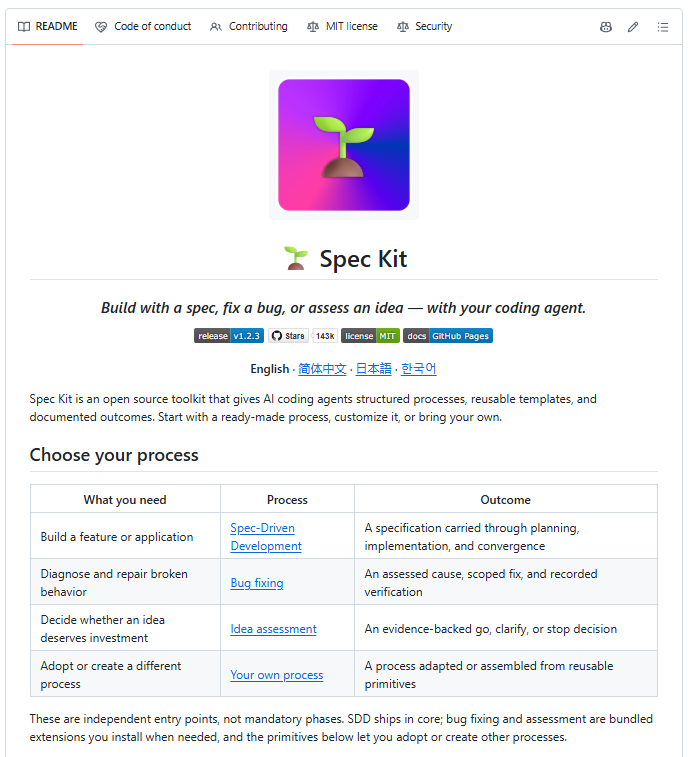
GitHub ha sacado spec-kit
La idea: dejas de pedirle cosas al agente a lo loco y escribes primero la especificación.
Luego el agente la ejecuta.
El flujo son 5 comandos:
/speckit.constitution → los principios de tu proyecto
/speckit.specify → qué quieres construir
/speckit.plan → stack y arquitectura
/speckit.tasks → lista de tareas real
/speckit.implement → lo construye
Funciona con 30+ agentes:
- Copilot,
- Claude
- Codex
- Cursor
y muuuuchos más.
Link al repo en los comentarios👇🏼
Your AI isn't bad at design. It has just never seen good design.
I've tested 100+ vibe coding resources this year. These are the 40 I actually kept, grouped by what you're stuck on.
Bookmark this 🔖
1. 👑
Why it's different from everything below:
- Every one is a complete prompt, not a snippet you wire up yourself
- 3 steps: copy the prompt, paste it into your AI, launch it live
- 300+ award-winning prompts, all in one place
- Full source code to download and edit
- Works with Claude Code, Cursor or v0
Built for founders and freelancers who want award-level sites without a design team or a week of tweaking. If you only open one link in this post, make it this one.
2. - design systems as markdown your agent can read
3. - ready-made prompts for dashboards and landing pages
4. - curated high-end sites
5. - real UI inspiration mapped to prompts
6. - 2,000+ real product styles with typography
7. - 2,600+ examples of how top design systems solve the same element
8. - curated collection of beautiful websites
9. - the best of web design, recognized and ranked
10. - showcase of the best animation websites
11. - curated landing pages
12. - mobile design patterns
13. - experimental web design projects
14. - navigation patterns
15. - footer layouts
16. - conversion-tested forms, popups and buttons
17. - curated hero sections
18. - the best pricing page examples
19. - community component marketplace that plugs into agents via MCP
20. - still the gold standard
21. - 200+ animated React and Tailwind components
22. - 150+ animated components and effects
23. - advanced interactions
24. - open-source UI elements
25. - animated components built on Motion and GSAP
26. - 2,000+ pre-built section blocks for shadcn/ui
27. - 150+ motion effects with React code and prompts
28. - micro-interactions
29. - glass refraction components
30. - lightweight animation engine
31. - the most popular web 3D library
32. - the standard online shader editor and community
33. - free interactive intro to fragment shaders
34. - full Three.js course with shader chapters
35. - 2,000+ hand-drawn illustrations
36. - 3D icons
37. - command-line AI coding agent
38. - AI-first code editor
39. - Vercel's prompt-to-component tool
40. - AI app builder in the browser
Which one should I add next?