Publicações com #XcodeTips

#XcodeTips

Publicações públicas do X que usam #XcodeTips.

Hashtags relacionados

  1. Cornelius Mark✓@corneliusmark
    Master Xcode shortcuts and save hours each week! Some must-learns: ⌘+Shift+O for file search, ⌃+I for indentation, and ⌃+6 for quick method navigation. A small time investment upfront pays huge productivity dividends. #XcodeTips
    202102
  2. David Steppenbeck@dsteppenbeck
    In case you didn't know, you can quickly show and hide individual changes to source control in Xcode with ⌘+click on the blue side bar. You can also discard an individual change without discarding other changes in the file. #Xcode #XcodeTips
    Baixar
    3728
  3. OhMySwift@ohmyswiftblog
    Arrays are one of the most widely used data structures in Swift, and we deal with a lot of array manipulations. One such manipulation is the removal of the last element from an array. Let's explore how to do it efficiently! #swift #ios #xcodetips #array
    029
  4. David Steppenbeck@dsteppenbeck
    Did you know you can drag and drop your code around in #Xcode? This is great for making quick, minor adjustments to the ordering of variables, for example. You can even copy code from one file to another. #XcodeTips
    Baixar
    6867
  5. David Steppenbeck@dsteppenbeck
    Here's another good one for moving code around: Use cmd+opt+{ and cmd+opt+} to move code up and down, respectively. If no code chunk is selected, it'll move whichever line you're on. Also, you can use cmd+{ and cmd+} to indent code right and left. #Xcode #XcodeTips
    Baixar
    31158
  6. David Steppenbeck@dsteppenbeck
    Here's another neat little time saver. If you want to make the same edit across multiple lines, press and hold the option key and drag the cursor down the lines you want to edit. After making your edits, tap esc or click anywhere on screen. #Xcode #XcodeTips
    Baixar
    41055
  7. David Steppenbeck@dsteppenbeck
    Everyone's no doubt noticed that when you move the cursor over a curly brace #Xcode will flash its opening or closing counterpart. However, you can also double click the curly braces, which will select all the code in that chunk. Can be a useful visual aid at times. #XcodeTips
    Baixar
    1359301
  8. David Steppenbeck@dsteppenbeck
    This one's great for quickly jumping around inside files: Command + L then input the line you want to go to. Fast way to get back to the top of the file. #Xcode #XcodeTips
    Baixar
    2317
  9. Seth Sandler 🙌@SethSandler
    🔥 Unlock the speed of coding in Xcode with this pro-level shortcut! ⚡️ Press ⌘ + Shift + ] or [ to navigate between open code tabs. 💡 Effortlessly switch between files and keep your development flow intact. #XcodeTips #CodingShortcuts #ProductivityHacks
    0121.3K
  10. Harry Ng 💻📱✓@harryworld
    Xcode Tips: 在模組中新增 SwiftUI 檔案的命名捷徑 當使用 Xcode 在模組中新增 SwiftUI View,不會顯示對話框詢問檔案名稱 這時候有兩個方法 1. 在 main app 中新增,然後把 View 拖進去模組 2. 在原本的檔案中先寫,然後使用 Refactor > Extract Selection to File #XcodeTips
    Baixar
    102305
  11. David Steppenbeck@dsteppenbeck
    If you’re using source control and want to quickly loop through all your changes in a file, use ⌃\ and ⌃| to jump to the next and previous changes. #Xcode #XcodeTips
    Baixar
    1013
  12. David Steppenbeck@dsteppenbeck
    Huh. So #Xcode can open new editors *below* as well as side by side. Pretty much lets you create a grid containing as many editors as you want... I need a bigger screen. Use ctrl+opt+cmd+T for this one (see next Tweet for more). #XcodeTips
    Baixar
    2213
  13. Shuhari✓@NSShuhari
    current Xcode beta has managed to make device previews even worse, buggy SwiftUI preview code can now trigger full device reboots not SpringBoard crashes - actual system restarts impressive work #XcodeTips
    204450
  14. Shuhari✓@NSShuhari
    Xcode 26's ⌘+0 shortcut changed it now focuses the Coding Assistant first, requiring a second press to actually close the Navigators panel. #XcodeTips
    023559
  15. 13✓@ethanhuang13
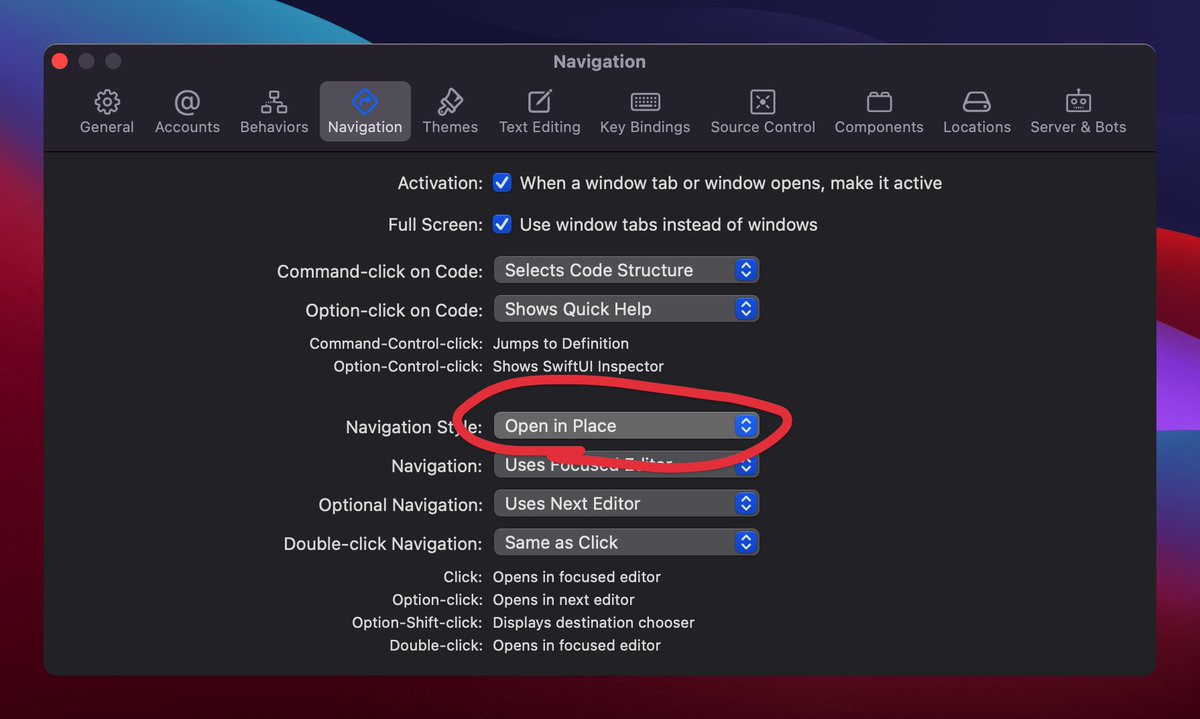
    如果你還不知道怎麼關掉 Xcode 12 的雙 Tab Bars 的話,在設定裡把 Navigation Style 改回 Open in Place #XcodeTips
    Baixar
    1527
  16. Ilker✓@ilkerulusoy
    En çok kullandığım bazı IDE'lerde geçici tab özelliği var. Özellikle Xcode'da çok kullanıyorum. Geçici tableri italic olarak yazıyor. Çift tıklarsanız onları kalıcı hale getiriyor. #xcodetips #ios
    Baixar
    11111.1K
  17. David Steppenbeck@dsteppenbeck
    This is a great little time saver, in case you didn't know... Option-click a file in Xcode to quickly open it in the next editor #Xcode #XcodeTips
    125
  18. jc@n3c2j1
    Thanks. Will be useful for SwiftUI as the order of the modifiers matters. Quick way to change and test that if result is not what’s expected. Kudos. #XcodeTips #SwiftUI
    David Steppenbeck @dsteppenbeck
    Did you know you can drag and drop your code around in #Xcode? This is great for making quick, minor adjustments to the ordering of variables, for example. You can even copy code from one file to another. #XcodeTips
    002
  19. Mostrar mais publicações