Posts avec #iOSDevTips

#iOSDevTips

Les posts publics sur X qui utilisent #iOSDevTips.

Hashtags associés

  1. Lickability@lickability
    @lickability
    🪧 Our designer was super excited that UIMenu gained size options for elements in iOS 16! Specify them with the preferredElementSize API: #iOSDevTips
    Télécharger
    118
  2. Lickability@lickability
    @lickability
    🪫 If the Xcode 14 beta is draining your laptop battery, our friend @chrisvasselli put together a blog post with a workaround! It's been a lifesaver. #iOSDevTips
    123
  3. Lickability@lickability
    @lickability
    We’re back with more #iOSDevTips 👋 If you’re localizing your app & not sure how to find every string you need to localize, edit your scheme and check “Show non-localized strings” in Run → Options. Then, look for all-caps strings. via @kharrison!
    Télécharger
    104679
  4. Lickability@lickability
    @lickability
    Here's a tip from @bcapps 📣 Starting in Xcode 11, you can mark assets as “development assets,” and they won't be added to your shipping app—which is great for test data in SwiftUI previews! #iOSDevTips
    1326
  5. Lickability@lickability
    @lickability
    This week's tip is from @daisyr317! You can specify a hex value when defining colors in asset catalogs by selecting an individual color variant and using the Attributes Inspector. Comes in pretty handy if your design system uses hex values! 🎨 #iOSDevTips
    Télécharger
    105
  6. Lickability@lickability
    Xcode 15 has gotten so good! This is so much better than scrolling through a tiny list of parameter permutations. ➡️➡️➡️ #iOSDevTips
    Natalia Panferova @natpanferova
    One of my favorite improvements in Xcode 15 code completion is the ability to see all the possible parameter permutations for functions by pressing the right arrow key #WWDC23
    003683
  7. Natalia Panferova✓@natpanferova
    One of my favorite improvements in Xcode 15 code completion is the ability to see all the possible parameter permutations for functions by pressing the right arrow key #WWDC23
    2813422.4K
  8. Lickability@lickability
    Every week, one of our iOS devs shares a special tip in the engineering meeting. Here’s this week’s tip from @mliberatore: Treat your Xcode search results as a to-do list and delete (⌫) results when you no longer need them. #iOSDevTips
    Télécharger
    10131450
  9. Lickability@lickability
    @lickability
    Our engineers have been waiting for this feature since SwiftUI was introduced! Thanks @Clarko for the #iOSDevTips 🙏
    Whoa, pull-to-refresh has a new trick in iOS 16 beta 4 👀 Used to be, SwiftUI could only do it on Lists. You have a Grid? Tough cookies. Now seems to work on any ScrollView!
    112
  10. [email protected]@Clarko
    Whoa, pull-to-refresh has a new trick in iOS 16 beta 4 👀 Used to be, SwiftUI could only do it on Lists. You have a Grid? Tough cookies. Now seems to work on any ScrollView!
    Télécharger
    541480
  11. Lickability@lickability
    @lickability
    If you’re ever writing UI tests and you want to see a textual representation of the UI tree, run print(XCUIApplication().debugDescription) 🤖 Thanks for the tip @UIGodess! #iOSDevTips
    Télécharger
    201
  12. Lickability@lickability
    @lickability
    Another tip from @mliberatore: If you work on one project every day, you’re probably tired of cd-ing to that directory. Save keystrokes by adding "cd /project/directory/here" to your .bash_profile or .zshenv. Now, every new Terminal window and tab will start there! #iOSdevtips
    Télécharger
    137
  13. Lickability@lickability
    @lickability
    ✨ A tip from @mliberatore: I don’t know who needs to hear this, but if you’re using an M1 Mac and your dependencies don’t support multiple simulator architectures, check “Open using Rosetta” in the Info Panel on Xcode and Simulator, and relaunch! #iOSDevTips
    Télécharger
    115
  14. Lickability@lickability
    @lickability
    ⌨️ One of our most-used Xcode keyboard shortcuts is ⌃⌘↑ — which lets you jump straight to an Objective-C header file for the current class, or generated interface for a Swift file. #iOSDevTips
    Télécharger
    123
  15. Lickability@lickability
    @lickability
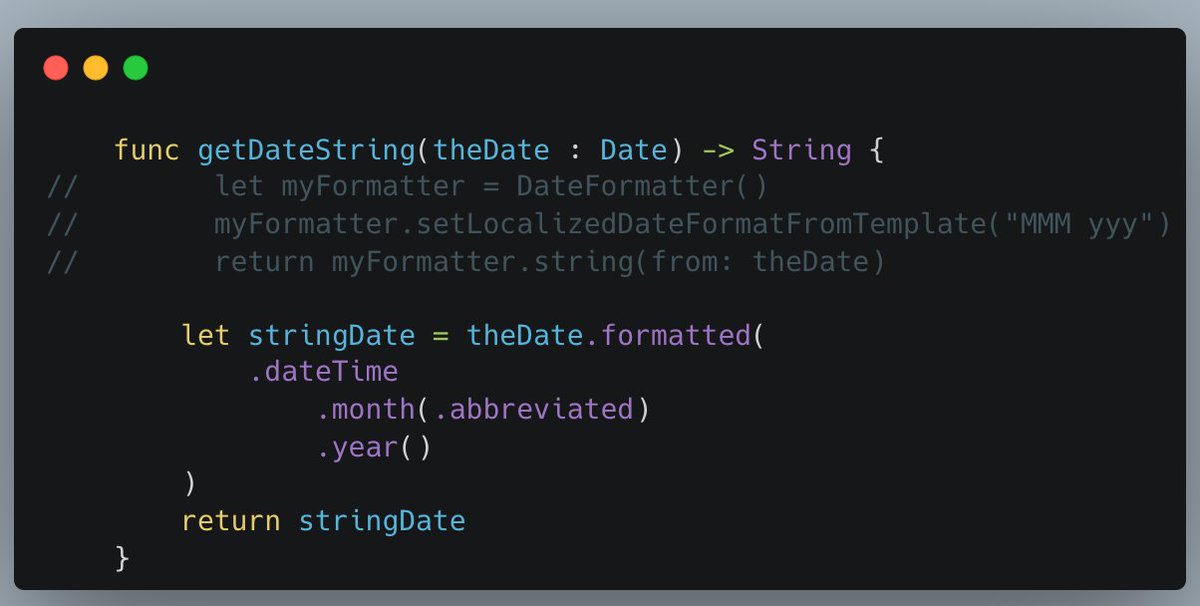
    ⏰ It’s super easy to forget about the Date.formatted() method that was introduced in iOS 15—so thank you to our friend @MuseumShuffle for this #iOSDevTips reminder
    Chris Wu @MuseumShuffle
    Wow! Rising star @tundsdev showed me there's a much easier way to display the specific date I wanted that will adapt to locales. I've been using .formatted(date:, time:) a lot but had no idea that this other variation existed.
    125
  16. Chris Wu@MuseumShuffle
    Wow! Rising star @tundsdev showed me there's a much easier way to display the specific date I wanted that will adapt to locales. I've been using .formatted(date:, time:) a lot but had no idea that this other variation existed.
    Télécharger
    3123
  17. Lickability@lickability
    @lickability
    @JordanMorgan10 Ever have your unit tests fail and end up with a console full of logs you don't understand? We've been loving this new feature from Kaleidoscope that helps you get to the bottom of it! 🕵️‍♂️🔍 #iOSDevTips
    Kaleidoscope @kaleidoscopeapp
    Want to avoid the drudgery of interpreting complex XCTest failures? Kaleidoscope makes the diffs easy to spot! Here’s how:
    123
  18. Kaleidoscope@kaleidoscopeapp
    Want to avoid the drudgery of interpreting complex XCTest failures? Kaleidoscope makes the diffs easy to spot! Here’s how:
    2942
  19. Lickability@lickability
    @lickability
    @JordanMorgan10 Last year, we found a performance issue in UICollectionViewDiffableDataSource. After reporting the bug & speaking to Apple at WWDC, @Cordavi was excited that it's now fixed in the iOS 15.4 beta! If you have this issue, try Xcode beta 🎉 #iOSDevTips
    mb @mb
     friends that work on UIKIt, I’d really appreciate you taking a look at a pretty big performance regression in UICollectionViewDiffableDataSource that @Cordavi recently found. applefeedback://FB9649428
    112
  20. mb✓@mb
     friends that work on UIKIt, I’d really appreciate you taking a look at a pretty big performance regression in UICollectionViewDiffableDataSource that @Cordavi recently found. applefeedback://FB9649428
    1310
  21. Lickability@lickability
    @lickability
    🚂 Our engineers on larger projects have been waiting for this @github feature for a long time. Can't wait to queue up some PRs! #iOSDevTips
    113734
  22. Afficher plus de posts