Posts with #iOSdevtips

#iOSdevtips

Public posts on X that use #iOSdevtips.

Related hashtags

  1. Lickability@lickability
    Every week, one of our iOS devs shares a special tip in the engineering meeting. Here’s this week’s tip from @mliberatore: Treat your Xcode search results as a to-do list and delete (⌫) results when you no longer need them. #iOSDevTips
    Download
    10131450
  2. Lickability@lickability
    @lickability
    🪫 If the Xcode 14 beta is draining your laptop battery, our friend @chrisvasselli put together a blog post with a workaround! It's been a lifesaver. #iOSDevTips
    123
  3. Lickability@lickability
    @lickability
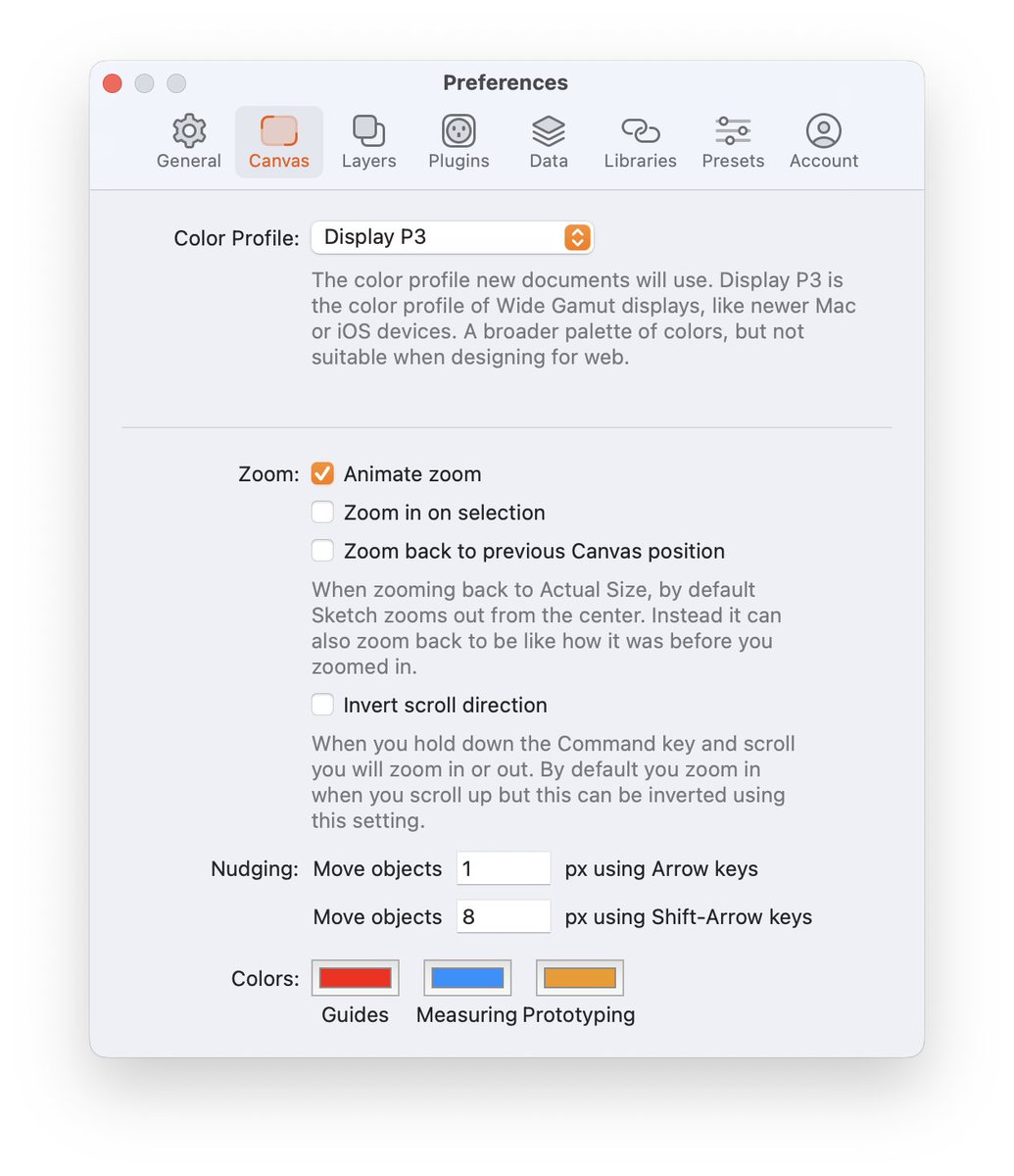
    If you’re not already using an 8pt grid in your designs, @sketch makes it super easy to get into the habit with a configurable nudge shortcut. Set it up in the Canvas Preferences, under “Nudging” 👇 #iOSDevTips
    Download
    315
  4. Lickability@lickability
    @lickability
    Today’s tip is from @mb about localization: 🌍 Ever forget to localize a string? Use Xcode’s Refactor → Wrap in NSLocalized String command to make localizing your UI copy a snap. Right click on any string, run the command, add the comment, and you’re done. #iOSDevTips
    Download
    1215
  5. Lickability@lickability
    @lickability
    Here's a tip from @bcapps 📣 Starting in Xcode 11, you can mark assets as “development assets,” and they won't be added to your shipping app—which is great for test data in SwiftUI previews! #iOSDevTips
    1326
  6. Lickability@lickability
    @lickability
    This week's tip is from @daisyr317! You can specify a hex value when defining colors in asset catalogs by selecting an individual color variant and using the Attributes Inspector. Comes in pretty handy if your design system uses hex values! 🎨 #iOSDevTips
    Download
    105
  7. Lickability@lickability
    @lickability
    Our engineers have been waiting for this feature since SwiftUI was introduced! Thanks @Clarko for the #iOSDevTips 🙏
    Whoa, pull-to-refresh has a new trick in iOS 16 beta 4 👀 Used to be, SwiftUI could only do it on Lists. You have a Grid? Tough cookies. Now seems to work on any ScrollView!
    112
  8. [email protected]@Clarko
    Whoa, pull-to-refresh has a new trick in iOS 16 beta 4 👀 Used to be, SwiftUI could only do it on Lists. You have a Grid? Tough cookies. Now seems to work on any ScrollView!
    Download
    541480
  9. Lickability@lickability
    @lickability
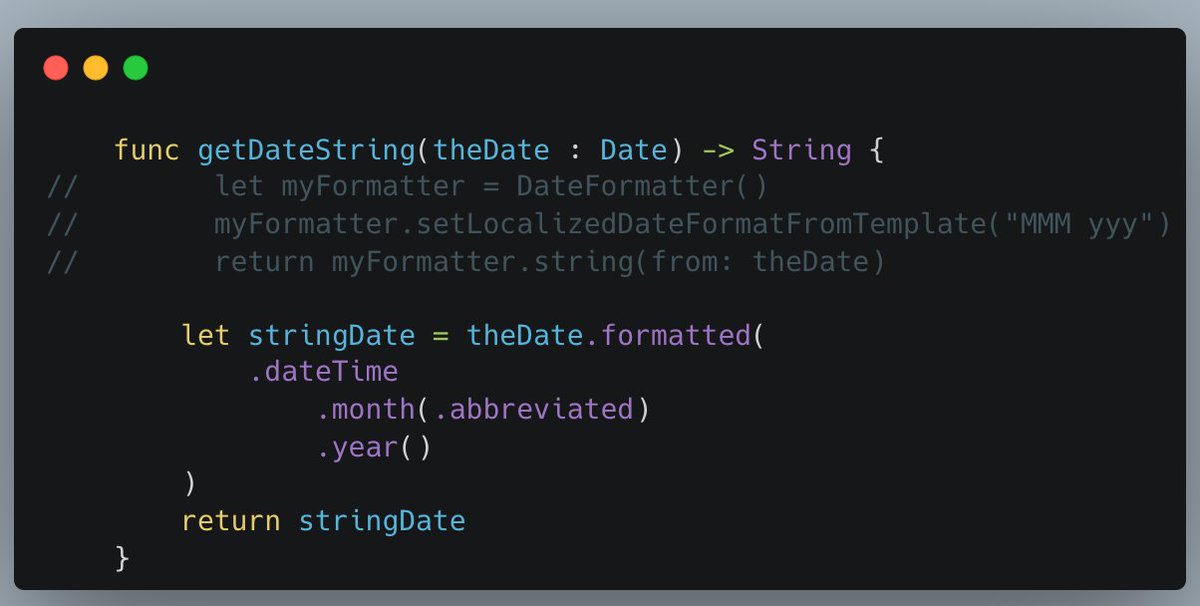
    📅⏰ Ever since last WWDC, we’ve been loving how quick it is to format dates & times with Foundation’s slick .formatted() method! #iOSDevTips
    Mohammad Azam @azamsharp
    Formatting Date and Time in SwiftUI #SwiftUI
    1051.2K
  10. Lickability@lickability
    @lickability
    ⏰ It’s super easy to forget about the Date.formatted() method that was introduced in iOS 15—so thank you to our friend @MuseumShuffle for this #iOSDevTips reminder
    Chris Wu @MuseumShuffle
    Wow! Rising star @tundsdev showed me there's a much easier way to display the specific date I wanted that will adapt to locales. I've been using .formatted(date:, time:) a lot but had no idea that this other variation existed.
    125
  11. Chris Wu@MuseumShuffle
    Wow! Rising star @tundsdev showed me there's a much easier way to display the specific date I wanted that will adapt to locales. I've been using .formatted(date:, time:) a lot but had no idea that this other variation existed.
    Download
    3123
  12. Lickability@lickability
    @lickability
    If you’re ever writing UI tests and you want to see a textual representation of the UI tree, run print(XCUIApplication().debugDescription) 🤖 Thanks for the tip @UIGodess! #iOSDevTips
    Download
    201
  13. Lickability@lickability
    @lickability
    📲 Ever needed to find the device ID of a running iOS Simulator? Try this handy Terminal command from @daisyr317: xcrun simctl list | egrep '(Booted)' #iOSDevTips
    102
  14. Lickability@lickability
    @lickability
    This set of resources that recently came out is very helpful—thanks for sharing, @mikaela__caron 🙏 #iOSDevTips
    Mikaela Caron 🦄 @mikaela__caron
    💡Have you ever had an app idea, but no clue what to do next? I just saw this in the Apple Developer App, how to plan an app on all of Apple’s platforms, iOS, iPadOS, macOS, etc. It covers what you can do, where to start, and how to take your app further
    114
  15. Mikaela Caron 🦄@mikaela__caron
    💡Have you ever had an app idea, but no clue what to do next? I just saw this in the Apple Developer App, how to plan an app on all of Apple’s platforms, iOS, iPadOS, macOS, etc. It covers what you can do, where to start, and how to take your app further
    52088
  16. Lickability@lickability
    @lickability
    We’re back with more #iOSDevTips 👋 If you’re localizing your app & not sure how to find every string you need to localize, edit your scheme and check “Show non-localized strings” in Run → Options. Then, look for all-caps strings. via @kharrison!
    Download
    104679
  17. Gabriel Marquez@gmarquezrivas
    Hey iOS developers! Remember every time you encounter a bug or face a setback you're just one step closer to success. Embrace the failures, learn from them, and keep pushing forward. Who knows maybe you'll be the next big thing in the App Store! #FailToSucceed #iOSDevTips 📱💻🚀
    0011251
  18. Lickability@lickability
    @lickability
    🤝Here’s a tip from @mb: don’t forget to credit your teammates when you’re pair programming using @github’s co-authors feature. #iOSDevTips Here’s how to use it:
    Download
    124
  19. Lickability@lickability
    @lickability
    👀 For those times you don’t want to be distracted by Twitter, did you know that you can fullscreen Xcode and the Simulator side-by-side with split screen? #iOSDevTips via @mb
    Download
    315
  20. Lickability@lickability
    @lickability
    🔂 One of our favorite tiny additions to SwiftUI this year is the new .buttonRepeatBehavior modifier, which lets you make buttons that keep performing an action as you hold them! #iOSDevTips
    Download
    Hidde van der Ploeg @hiddevdploeg
    So nice that this is now possible with a single line of code in SwiftUI (hold to repeat the action) It even speeds up as you hold it 😍
    1131.3K
  21. Hidde van der Ploeg✓@hiddevdploeg
    So nice that this is now possible with a single line of code in SwiftUI (hold to repeat the action) It even speeds up as you hold it 😍
    Download
    3723445.2K
  22. Lickability@lickability
    @lickability
    🤯👠 Our SwiftUI engineers are head over heels for this change. No more need for arbitrary Groups to work around the limit! #iOSDevTips
    Paul Hudson @twostraws
    ICYMI: Xcode 15b3 is out, and – hurray! – has removed the 10-view limit in SwiftUI. You can now add as many child views as you want without using Group 🎉
    002334
  23. Paul Hudson✓@twostraws
    ICYMI: Xcode 15b3 is out, and – hurray! – has removed the 10-view limit in SwiftUI. You can now add as many child views as you want without using Group 🎉
    1771456128K
  24. Lickability@lickability
    @lickability
    Another tip from @mliberatore: If you work on one project every day, you’re probably tired of cd-ing to that directory. Save keystrokes by adding "cd /project/directory/here" to your .bash_profile or .zshenv. Now, every new Terminal window and tab will start there! #iOSdevtips
    Download
    137
  25. Show more posts