Posts with #codespace
#codespace
Public posts on X that use #codespace.
Related hashtags

Did you get your enrollment key in the @get_optimum Console yet? I got mine! And to be completely honest, I quickly spun it up in Codespaces first just to test the waters and see what’s what. But after digging deeper into the docs and network architecture, I immediately moved it to a dedicated VPS. Here’s why: Let’s be real for a second: if you genuinely want to support the protocol rather than just clicking buttons for the sake of it - forget about Codespaces, Colab, or running it on your daily laptop. Why running a P2P gateway in transient sandbox environments does more harm than good: 1. The mesh hates "blinking" nodes. Optimum’s P2P mesh (mump2p on port 33213) handles live Ethereum Mainnet blocks every 12 seconds. When a node flickers online for 15 minutes behind Codespaces’ janky NAT and then vanishes, it doesn't help the network - it just creates topological churn and useless reconnection overhead for 40+ live peers. 2. The real value is 24/7 telemetry. The gateway runs with telemetry flags enabled. For Optimum's engineering team, every stable node acts as a live probe streaming continuous data on connection quality, transit latency, and RLNC matrix convergence across regions. A laptop that goes to sleep or a sandbox that times out produces zero useful telemetry. How to do it properly in the exact same 2 minutes? Throw it on any dirt-cheap $3–$4/mo VPS: • The gateway is completely featherweight: no 2TB SSD or 32GB RAM needed like with a full Ethereum node. • It sips ~300MB of RAM and barely scratches the CPU, running smoothly as a background Docker container with --restart unless-stopped. • All it really needs is a stable connection and a persistent IP to keep mesh peering solid. (A quick console pro-tip: default keys are often minted with a 24-hour expiration. Take a few extra seconds in the key settings to set the validity to 1 year so you don't have to deal with re-enrolling every single day). There are no leaderboards, no referral links, and no point-farming here. But if we believe in the technology and actually want to make a real contribution - let’s do it the right way. @MurielMedard @kentlinyy @blockchainjeff9166633
一个扎心的事实 你在 GitHub 上开个 Codespaces,每月白送 120 小时的云端开发环境 外加 15GB 存储,Pro 用户是 180 小时 电脑带不动、在网吧也能写代码 这么好的东西,你们用上了吗?505821
Alexis Perrier@alexipIt's Saturday! #AI build time! This week end, I'm designing a workshop to teach Agentic AI using Ollama, Opencode on Github Codespaces So ... what are YOU building?802140
I wanted a Codespaces view that shows what’s left and where it’s going: compute and storage separately, daily pace, per-repo table. It reads GitHub billing data, updated hourly—not a live per-Codespace meter.00117
You don't need to run your own validator to become part of the @get_optimum ecosystem. Optimum supports Stream only Gateways, allowing you to connect to the mump2p mesh, receive blockchain data, and serve it to your own consumers without running a Beacon Node or managing validator infrastructure. The author describes it as “a convenient way to explore Optimum without setting up a dedicated server or installing Docker on your personal computer,” walking through the setup using GitHub Codespaces. First, create a private repository on GitHub and launch Codespaces. In the terminal, create persistent directories with mkdir -p "$HOME/optimum-gateway/libp2p"and the mump2p folder. These directories matter because they help the Gateway retain its identity if the container is recreated. Next, generate an Enrollment Key from the Optimum Console under Signal > Gateways & keys. Make sure the correct network (Ethereum Mainnet) is selected. Treat the key like a password and never share it. Enter it in the Codespaces terminal using read -rsp "Enter your Enrollment Key: " OPT_JOIN_KEY. Generate the Stream only Docker command from the Console by selecting “A feed for my consumers” and run it in the terminal. Always use the command from your own Console rather than copying one from someone else’s guide. Check the setup with docker ps and curl http://localhost:48123/health. A healthy response includes "status": "healthy" along with the gateway_id. Once Signal shows as active and 1 Active Gateway appears in the Console, the setup is complete. Keep the Enrollment Key private, use persistent directories, and assign a unique key to each Gateway. Codespaces works well for testing but is not a permanent 24/7 solution, as availability depends on your plan and usage limits. Running a Gateway does not automatically guarantee rewards or points. This approach offers a practical way to join Optimum without heavy infrastructure. Thank you @vssema11 @discordflash @ada_pegasusvssema @vssema1120785
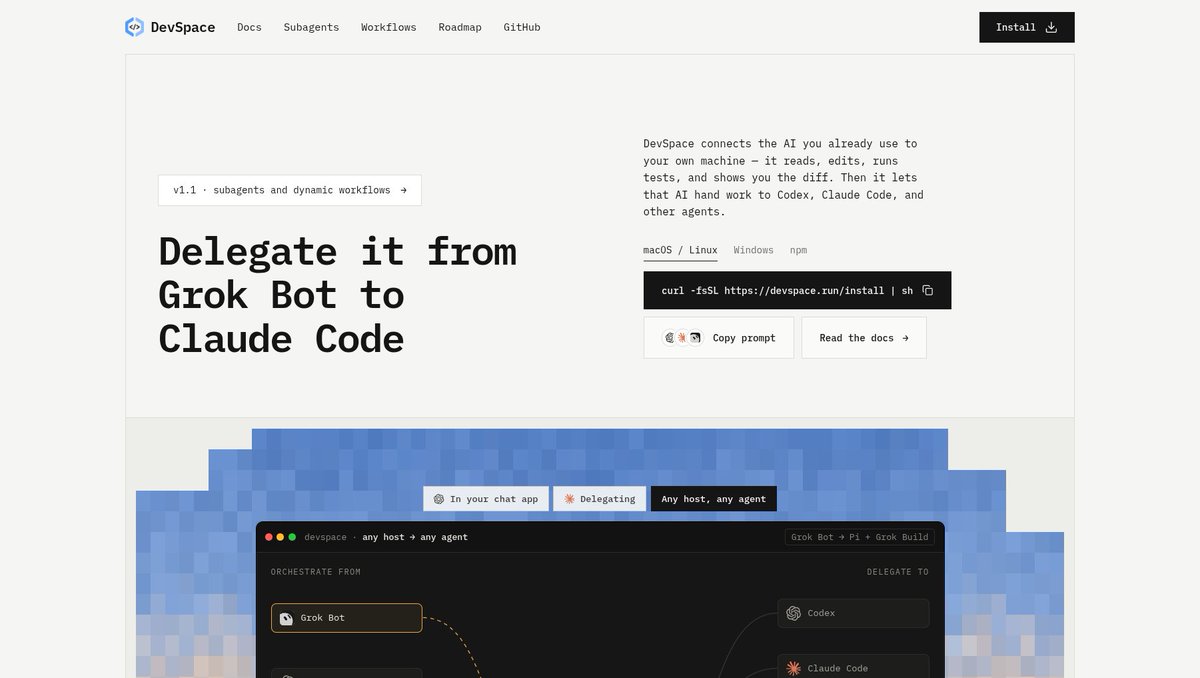
an always-on 16gb box with an agent already living in it is a devbox, not a chatbot perk. tunnel in and cancel the codespaces subwaishnav @wshxnvask your grok bot to set this up. each grok bot gets its own computer with pretty good specs (16 GB RAM + a good CPU). so why not turn it into your remote dev environment while elon and cursor are basically giving away free compute? anyway, here's how: ask your grok bot to install claude code, codex, opencode, or whichever coding agent you use. sign in with your existing subscription. ask it to install and it's subagent skills that's it. now, from your PM bot's or any bot's chat, you can delegate coding tasks directly to claude code, codex, opencode, grok cli, or pretty much any coding agent harness (except antigravity, obviously its not good so no support). your grok bot handles the orchestration and your intend translation, its computer handles the execution, and your existing coding subscriptions cover the tokens. free compute + subsidized tokens = pretty sweet deal. and you won't burn through your grok limits nearly as fast. enjoy the compute arbitrage while it lasts.0001
ask your grok bot to set this up. each grok bot gets its own computer with pretty good specs (16 GB RAM + a good CPU). so why not turn it into your remote dev environment while elon and cursor are basically giving away free compute? anyway, here's how: ask your grok bot to install claude code, codex, opencode, or whichever coding agent you use. sign in with your existing subscription. ask it to install and it's subagent skills that's it. now, from your PM bot's or any bot's chat, you can delegate coding tasks directly to claude code, codex, opencode, grok cli, or pretty much any coding agent harness (except antigravity, obviously its not good so no support). your grok bot handles the orchestration and your intend translation, its computer handles the execution, and your existing coding subscriptions cover the tokens. free compute + subsidized tokens = pretty sweet deal. and you won't burn through your grok limits nearly as fast. enjoy the compute arbitrage while it lasts.600167
GitHub Educationの教職員資格では1 Passwordはサービス外らしい… GitHub Education as a teacherの申し込み▽ 得られるbenefitsは以下の通り▽ ・GitHub Copilot Pro: AIコーディング支援ツールの無料利用 ・GitHub Team: 授業や研究室用オーガナイゼーションのアカウント機能アップグレード ・Codespaces / Actions: クラウド開発環境・自動化の実行上限の拡張 ・Teacher Toolbox: 授業用教材テンプレートや教育者専用コミュニティへのアクセスTaketo Fujimaki @tf_makimaki1password、学生はgithub student developer packで2年間無料です。 おれも今導入してる014662
1password、学生はgithub student developer packで2年間無料です。 おれも今導入してる23336227.6K
One lesson from building Antigravity Codespaces Pro: the workspace can be fine while local `gh` auth, SSH, or Remote-SSH isn’t. Setup Doctor checks those pieces before connecting. Host support varies.0015
💡 Tip of the day #13 A free cloud dev machine for any repo. Open a repo: Code, Codespaces, Create. 120 free core hours a month. About 60 hours on 2 cores. Good for: testing a repo safely.00021
I locked down my vscode extensions months ago. all companies will eventually force all development off of developer laptops into a centrally controlled remote environment, and this is one reason (there are many others)Spenser Skates @spenserskates4 of the top 5 posts on HN right now are about cybersecurity incidents We've officially entered a new era53986.8K
4 of the top 5 posts on HN right now are about cybersecurity incidents We've officially entered a new era273538092.5K
@DuckDeleuze@DuckDeleuze A lot of people and companies tried, the DX always sucked. Maybe it still will but the advantages are too great now10035
🦆@DuckDeleuze@nateberkopec@nateberkopec Ya, I originally had a lot of hope for things like Github Codespaces, but they were far too unstable and had sufficiently high upkeep/barrier to entry/inertia. My personal workflow is now similar to herdr which I think more people would adapt if they knew or cared.1016
My GitHub bill has a ceiling of $0. Four budgets: Actions, Packages, Codespaces, Git LFS. Each set to $0.00. Each says "Usage blocked." Past the free tier, a runaway CI loop doesn't bill me. It stops. Boring beats a surprise invoice. What's your cloud spend limit set to?00035
30 GitHub tricks every developer should know :- → Use GitHub Issues to track bugs and tasks. → Use Pull Requests to review code before merging. → Use GitHub Discussions to collaborate with developers. → Use GitHub Actions to automate workflows. → Use GitHub Pages to host static websites. → Use GitHub Gists to share code snippets. → Use GitHub Projects to manage projects. → Use GitHub Copilot to assist with coding. → Use README. md to document your projects. → Use Markdown to format documentation. → Use branch protection rules to protect important branches. → Use CODEOWNERS to assign code reviewers automatically. → Use GitHub Releases to publish software versions. → Use GitHub Tags to mark important commits. → Use GitHub Templates to standardize issues and pull requests. → Use GitHub Secrets to store sensitive workflow credentials. → Use Dependabot to update dependencies automatically. → Use CodeQL to identify security vulnerabilities. → Use GitHub Sponsors to support open-source developers. → Use Star to bookmark interesting repositories. → Use Fork to create your own copy of a repository. → Use Watch to receive repository notifications. → Use Pin Repositories to showcase your best projects. → Use Topics to make repositories easier to discover. → Use GitHub Search to find repositories, code, and developers. → Use Keyboard Shortcuts to navigate GitHub faster. → Use GitHub CLI to manage repositories from the terminal. → Use GitHub Codespaces to develop in a cloud environment. → Use .gitignore to prevent unnecessary files from being tracked. → Use CONTRIBUTING. md to guide open-source contributors.1010302.2K
Vocês pediram exemplos REAIS de IA aplicada, com código aberto e laboratório passo a passo. Eu publiquei um. Em português. Com testes, documentação e uma aplicação funcional. E quase ninguém testou. 😅 No DevDay Exchange Community do Rio de Janeiro desse ano, apresentei uma demonstração de um agente conversacional para triagem de chamados de TI usando GPT-Live + Decisions API da @OpenAI. E o que essa aplicação faz? Imagine que você conversa com um agente de IA e diz: 🎙️ "A VPN da filial cai a cada dez minutos e o financeiro parou. Registra." O agente recebe o relato por voz e, quando você solicita o registro, a aplicação aciona a Decisions API para: ✅ Avaliar se existem informações suficientes sobre o problema. ✅ Sugerir a equipe responsável pelo atendimento. ✅ Avaliar o impacto e a confiança da classificação. ✅ Criar um cartão em um quadro visual de triagem. ✅ Encaminhar casos incertos para revisão humana, permitindo que uma pessoa tome a decisão. Ou seja, não estamos falando apenas de um chatbot que responde perguntas. Estamos falando de IA conversacional integrada a um fluxo de decisão estruturado, com Human-in-the-Loop. E o melhor? Disponibilizei o projeto como open source, desenvolvido com Next.js e TypeScript, acompanhado de um laboratório detalhado para que qualquer pessoa possa estudar, executar localmente e compreender a arquitetura. Há até exercícios offline, sem necessidade de chave de API. Para experimentar a conversa por voz com os modelos reais, o material explica também a configuração e os custos envolvidos. Uma curiosidade: a demonstração foi tão bem recebida que houve quem comentasse que ela foi melhor do que a apresentada no DevDay Exchange de São Francisco. Mas, apesar dos elogios, o material teve pouquíssima tração depois do evento. Isso me fez refletir sobre algo: será que estamos mais interessados em assistir a demonstrações impressionantes de IA do que em abrir o código, entender a implementação e experimentar por conta própria? De qualquer forma, quero compartilhar novamente esse conteúdo com a comunidade. 🧪 Laboratório completo: 💻 Código open source: Se você experimentar, me conte o que achou! Pode abrir uma issue, propor melhorias ou compartilhar o que aprendeu. Meu objetivo com esse tipo de iniciativa é justamente contribuir para que mais pessoas consigam sair da teoria e construir aplicações de IA na prática. E vocês? Ainda têm interesse em laboratórios completos, com código e documentação, ou preferem outros formatos de conteúdo técnico?810874.1K
@glaucia_lemos86@glaucia_lemos86 @OpenAIDevs @OpenAI @paw_lean @romainhuet @rhiannon_io Interesse tem, mas o que faz alguém rodar num domingo é o tempo até o primeiro resultado. Umas ideias: - botão de Codespaces (ambiente pronto no navegador) no README - exercício offline como passo 1 - GIF de 20s do caso incerto indo pro humano Sabe em que passo a galera trava?00052
VS Code has extensions, terminal, Git, debugging, testing, and now AI agents, MCP, Claude and Codex integrations. You can do traditional development and full-on vibe coding in one place. So why does it feel like everyone is moving away from VS Code? What am I missing?23013506
ZJ • x610ck 🐦🔥@x610ck@Harshit_io777@Harshit_io777 nobody moved. the extensions are the marketplace, the auth is copilot seats, the compute is codespaces quota. leaving costs three migrations, not one.00011
@lassejlv@lassejlv im always reaching limits even for codespaces 2-7 days before the month ends001148
Bro reminded me of then when we used to giveaway free laptops. Good old times. Might consider doing same again soon. Do you need a laptop? I will be in comment.King.sol 🇶🇦 @teddi_speaksSent. I hope the laptop helps you in your web3 journey. If anyone asks you the benefits of attending web3 events, kindly show them this tweet. Thank you for listening & attending. Next time.3904862327.4K
Sent. I hope the laptop helps you in your web3 journey. If anyone asks you the benefits of attending web3 events, kindly show them this tweet. Thank you for listening & attending. Next time.1403662757.8K
BJØRN ♐@Wisdom_dev9@DigiTektrades@DigiTektrades I’m pursuing Data Engineering and Software Development, but my Chromebook limits me from running tools like Docker and local databases. A proper laptop would help me build real-world projects. Please consider supporting my journey; it would make a real difference. 🙏10161
@Wisdom_dev9@Wisdom_dev9 @DigiTektrades Hope the laptop comes through. Meanwhile, GitHub Codespaces' free monthly hours can run Docker and databases from a Chromebook browser, which might unblock some projects. I'm also building a cloud Linux PC for this kind of case (Disanchor, early, no signup yet).00135
Tunneelly@TunneellyWon a Source Fragment in a @dac_chain Interstellar crate? Here's how to use it. Where to run it: - Mac/Linux: Terminal - Windows: PowerShell - No laptop: GitHub Codespaces (a browser terminal) Need Git + Python 3.10+. Check: git --version and python3 --version 🧵8214360- Show more posts