The wallet you never outgrow.
Meet ERA: hardware security meets software convenience.
🔐 Keys stay offline. ERA Lens decodes supported transactions.
📱 Send, swap, bridge & use dApps.
Keylabs-tested hardware. Cure53-audited app.
Simple by default. Powerful when you need it ↓
48 wallets drained in 94 seconds.
On October 26, an attacker took 9,408 SOL (~$953K) from wallets linked to the Bloom trading bot.
Five of those wallets hadn't traded through Bloom since early 2025.
Every transfer was signed with the affected wallet's own key. How the attacker obtained those keys remains unknown.
An old bot wallet isn't necessarily a safe wallet.
Microsoft just patched an Authenticator flaw that let malicious Android apps steal access tokens without requesting permissions.
The lesson? Even trusted security apps depend on the environment they run in.
That's why separating authentication from your everyday phone matters. And why ERA supports offline 2FA.
Share
Copied
Cyber Security News@The_Cyber_News
‼️Microsoft Authenticator Flaw Lets Malicious Android Apps Steal Account Tokens With Zero Permissions
Details:
Microsoft patched high-severity flaw CVE-2026-80097 (CVSS 8.6) in Authenticator for Android, allowing malicious apps with no declared permissions to steal work account access tokens due to improper authentication in its broker component.
Microsoft classified the flaw as a local elevation-of-privilege vulnerability. The issue affected Android devices with Microsoft Authenticator installed and a signed-in work account.
#cybersecuritynews
‼️Microsoft Authenticator Flaw Lets Malicious Android Apps Steal Account Tokens With Zero Permissions
Details:
Microsoft patched high-severity flaw CVE-2026-80097 (CVSS 8.6) in Authenticator for Android, allowing malicious apps with no declared permissions to steal work account access tokens due to improper authentication in its broker component.
Microsoft classified the flaw as a local elevation-of-privilege vulnerability. The issue affected Android devices with Microsoft Authenticator installed and a signed-in work account.
#cybersecuritynews
Why would you shake a hardware wallet?
When creating a wallet in ERA's Expert Mode, you can add your own randomness by moving the device.
ERA combines this input with randomness from its hardware generators to help create your wallet's keys.
Your movements aren't the seed. They're an extra source of entropy.
A little more control over where your keys come from.
Your ERA Wallet is already set up. Need another backup copy?
No need to create a new wallet.
Open Recovery Manager → Clone, enter your card PIN, then place your existing Recovery Card against ERA.
Remove it, tap Next, and place a blank card to create a copy.
The new card holds the same encrypted backup and uses the same PIN.
Keep your backup copies in separate, secure locations.
Changing your wallet password won't help if someone already has your private key.
Polkadot warned that compromised versions of the Fearless Wallet browser extension could expose private keys when users unlocked their wallets.
If you used an affected version, create a new wallet with fresh keys and move your funds securely.
Reinstalling the extension won't make an exposed key safe again.
Why does an offline wallet need a camera?
ERA Wallet uses it to scan QR codes and exchange transaction data without connecting to the internet.
Your phone handles the network. ERA reviews and signs transactions offline.
And in Expert Mode, the camera can also contribute randomness when generating your wallet's keys.
One camera. Two very different jobs.
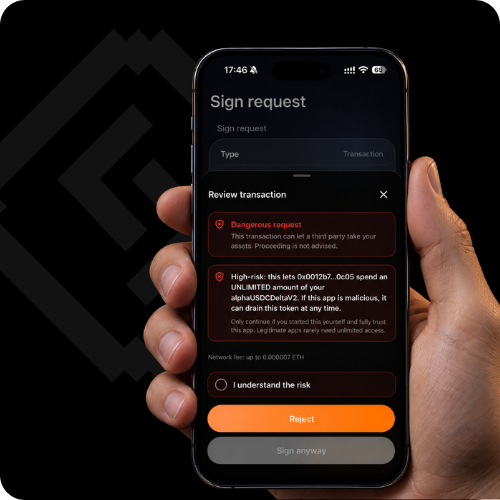
One signature can give a smart contract unlimited access to your tokens.
Not exactly the kind of surprise you want🙃
ERA Software Wallet helps you catch the red flags before you sign:
🚩 Suspicious transactions
🛑 Lookalike addresses
🔎 Risky token approvals
Scammers love blind trust. We prefer red flags.
RT @we_satoshis: Today we sent 21,000 sats from one air-gapped wallet (ERA @era_wallet) to another (Keycard Shell, @Keycard_) – signed and broadcast in 90 seconds.
No phone. No desktop. No web wallet. No cables. No Electrum servers.
Just QR codes, two air-gapped signers, and WeSatoshis talking to Bitcoin nodes directly – peer to peer. 🔗
Your hardware wallet shouldn't be afraid of a little rain.
ERA Wallet is built with IP67-rated dust and water resistance.
It's designed for life beyond a desk, whether you're commuting, traveling, or carrying it every day.
Security hardware should be practical to carry, too.
One signature. 28 executions.
On October 19, an attacker reportedly exploited two flaws in an Argent-style smart wallet system.
A recovery mechanism could be manipulated to bypass its intended delay. A separate replay flaw allowed previously signed operations to execute repeatedly.
Reported loss: $59,800.
A valid signature doesn't mean an authorization should be usable forever.
Your hardware wallet doesn't need an internet connection to sign a transaction.
ERA Wallet stays offline. No Wi-Fi, Bluetooth, or USB data connection.
Prepare a transaction in your software wallet, transfer it to ERA for review and signing, then broadcast it from your connected device.
Your private keys never need to leave the hardware wallet.
The phishing attack came disguised as a security alert.
NGRAVE users were targeted through compromised notifications in the LIQUID companion app, according to investigators.
The campaign was linked to an estimated $2.65M in suspected losses.
A hardware wallet can isolate your private keys. It can't verify every message appearing on your phone.
Never enter recovery words because a notification tells you to.
Two PINs. Two very different jobs.
Your ERA device PIN controls access to the device.
Your Recovery Card PIN protects access to the encrypted backup stored on the card.
Losing your device is one problem. Losing access to your backup is another.
Keep your Recovery Card PIN somewhere safe, separate from the card.
The website is real. The deposit address might not be.
Imagine opening a crypto service you've used dozens of times.
The URL is correct. Your account looks normal. You click Deposit, copy the address on the screen, and send your funds.
But an attacker has compromised the site's interface and replaced the deposit address with one they control.
Your wallet can sign the transaction correctly. The blockchain can process it exactly as instructed.
The money still goes to the attacker.
This is why transaction verification has a limit: a hardware wallet can show you where you're sending funds, but it cannot independently know who should own that address.
For unfamiliar or high-value destinations, verify the recipient through a trusted, independent channel before sending.
A legitimate website isn't proof that every piece of information displayed on it is trustworthy.
Bitcoin-only or multichain? Your call.
ERA has two firmware builds. Bitcoin-only leaves other chains' code out entirely.
Add Bitcoin multisig when you're ready.
Switch when your needs change.
Your phone handles the everyday. ERA holds the keys.
ERA Software Wallet:
• Portfolio across 14 networks
• Send, receive, buy & sell
• Swap, bridge & connect to dApps
• Security alerts & approval visibility
One ecosystem. More control as you grow.
Explore ERA →