Can people see who views your X (Twitter) profile? How to browse X anonymously
It’s one of the most-searched questions about X: if you look at someone’s profile, will they know? The short version is reassuring. The longer version matters if you really want to keep a low profile. This guide covers what X shows account owners, what can give you away, how to browse X without your account and what “anonymous” honestly means.
Short answer: no. X doesn’t show anyone a list of who viewed their profile or their posts. What people can see are the things you actively do while signed in, such as a like, a follow or a reply. If you browse without signing in to X at all, as you do on Lurkbird, there’s no X account to connect to the visit.
Enter a @username or paste an X link to open it, or any word or #hashtag to search posts.
What X shows account owners
X gives account owners numbers, not names:
- Profile visits. There’s no “who viewed your profile” feature on X, free or paid. Nobody can open a list of the people who looked at their page.
- Post views. Each post shows how many times it has been viewed. That’s a single total. It doesn’t say who.
- Analytics. Account owners can see totals such as impressions, profile visits and link clicks. These are counts and percentages, never a list of visitors.
Beware of “see who viewed your profile” apps. X doesn’t give that information to anyone, so no app or website can show it. Many of these apps ask you to sign in with your X account, which gives them access to your account. That’s a much bigger risk than the curiosity they promise to satisfy.
What can give you away on X
Looking is invisible. Doing things isn’t. When you’re signed in to X, these are visible to others:
- Likes. X made likes private in 2024, so other people can’t browse your likes. The author of a post can still see who liked it.
- Replies, reposts and quotes. These are public and appear under your name.
- Follows. The person you follow can see it, and so can anyone who checks your following list.
- Spaces. If you join an X Space while signed in, your profile picture appears in the list of listeners.
- Accidental taps. The most common way people are spotted is by mistake: a stray tap on the heart while scrolling someone’s old posts.
- Being found by contacts. Depending on your discoverability settings, X may suggest your account to people who have your email address or phone number. That isn’t about viewing, but it is how an account you thought was hidden gets noticed.
Viewing a profile while signed in doesn’t notify anyone either. Signing out simply takes away the chance of a stray tap.
How to browse X without your account
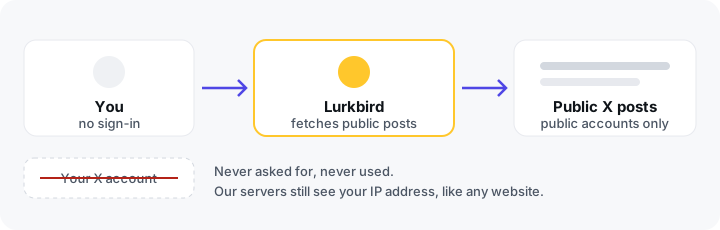
Lurkbird lets you read public X profiles, posts, search results and trends without signing in. That changes a few things:
- Your X account is never involved. We never ask for your X login, so nothing on X links the visit to you.
- There’s nothing to tap by accident. Lurkbird is read-only. There are no like, follow or reply buttons.
- We don’t ask who you are. There’s no sign-up, email address or password.
- The account owner isn’t told. Lurkbird doesn’t notify anyone that their profile or posts were looked at.
To get started, type a username into the search box (see how to view a profile without an account), search posts or browse the trends page.
What “anonymous” doesn’t mean
No website can make you invisible, and we won’t pretend Lurkbird does. Here’s what still happens when you use it:
- Our servers see your IP address, as every website’s servers do. Our privacy policy says: “Like most websites, our servers keep short-lived technical logs (IP address, the page requested, the time, and your browser’s user-agent) to run the site and defend against abuse. They are rotated quickly.”
- We use Google Analytics to count visits. Our privacy policy says: “Analytics sets cookies and receives your IP address, an approximate location, device and browser details, and the pages you view. Google processes this data on our behalf. We do not use it to identify you.”
- Photos and videos load from X’s media servers. When an image or video appears on a Lurkbird page, your browser fetches it from X’s media servers, so those servers see your IP address, the same as when any website embeds X media.
- Your network can see the website. Your internet provider, or your school or employer on their network, can usually see that you visited lurkbird.com. Because the connection is encrypted, they can’t see which pages.
- Your browser remembers. Pages you visit stay in your browser history unless you use a private window.
Full details are in our privacy policy.
If you want more privacy
- Use a private or incognito window so nothing stays in your history on a shared device.
- Use a trusted VPN if you don’t want websites, including ours, to see your real IP address, or your network to see which sites you visit.
- Stay signed out of X in the browser you use for looking around, so a stray tap can’t do anything.
- Block analytics cookies. From our privacy policy: “Block analytics cookies or use a content blocker to opt out of Google Analytics. That doesn’t change how the site works for you.”
If you’re the one being viewed
If you’d rather strangers didn’t read your posts, the reliable fix is on X itself. Make your account protected in X’s privacy settings. Only followers you approve will see your posts, and protected accounts are never shown on Lurkbird. If you own an account shown here, you can also ask us to hide it through our removal page.
For the other common questions, see how to download X videos or check what’s trending by country, all without signing in. Or start from the Lurkbird home page.
Frequently asked questions
- Can people see who viewed their X profile?
- No. X doesn't offer any feature that lists who viewed a profile. Account owners only see totals, such as how many times a post was viewed, never names.
- Can someone tell if I looked at their post?
- Not by name. A post's view count is a single number with no names attached. Things you actively do while signed in, such as liking, replying, reposting or following, are visible.
- Do apps that show who viewed your X profile work?
- No. X doesn't give that information to anyone, so these apps can't show it. Many ask you to sign in with your X account, which gives them access to it. Avoid them.
- Can anyone trace my visit to Lurkbird?
- Your X account can't be linked to it, because you never sign in. But like any website, our servers see your IP address and keep it in short-lived technical logs. Google Analytics, which we use to count visits, also receives your IP address and sets cookies. Your internet provider can see that you visited lurkbird.com. Use a trusted VPN if you need more privacy, and see our privacy policy for the details.
- How do I stop strangers from viewing my own X profile?
- Make your account protected in X's privacy settings. Then only followers you approve can see your posts, and protected accounts are never shown on Lurkbird. You can also ask us to hide your profile through our removal page.
Look someone up without your X account
Type a username, word or #hashtag below. Your X account stays out of it.
Enter a @username or paste an X link to open it, or any word or #hashtag to search posts.