What's trending on X (Twitter) right now, by country
X decides what’s trending separately for each place, so the list in Tokyo has little in common with the one in London or Mexico City. Without an account, though, x.com usually won’t show you trends at all. This guide shows how to check the current trends for a country without signing in, how X picks trends and how to read them sensibly.
Short answer: open the trends below, pick Worldwide or a country from the location menu, and tap any trend to see the posts behind it. No account needed.
Enter a @username or paste an X link to open it, or any word or #hashtag to search posts.
How X trends work
A trend is a topic, name, phrase or #hashtag that’s suddenly getting much more attention than usual in a place. It’s not simply whatever is being posted about most. A topic that people talk about every day, such as a big football club, only trends when something happens. That’s why trends feel so “now”.
A few things are worth knowing:
- Trends are local. X works out trends for each location separately. A news story can trend in one country and not appear at all next door.
- Trends change all day. A list can look completely different an hour later, especially around live events, sport and breaking news.
- Your X app shows personalized trends. When you’re signed in, X adjusts its “For you” trends to your account, who you follow and your interests. The location lists on Lurkbird aren’t personalized. Everyone who picks the same country sees the same list.
- Post counts are often missing. X sometimes shows how many posts a trend has, but for many trends it doesn’t share a number. When there’s no count, Lurkbird shows the trend’s rank only.
How to check trends for a country
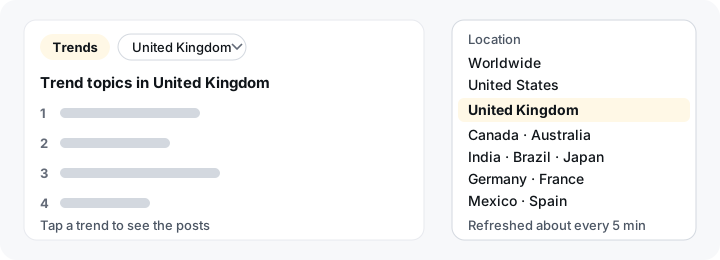
- Open the trends. Go to the trends page, or use the trends panel on the Lurkbird home page.
- Pick a location. Choose Worldwide or a country from the location menu. The ranked list updates for that place. Lurkbird remembers your choice in this browser, so next time you’ll start with the same location.
- Open a trend. Tap any trend to search the public posts about it. Use Latest to see what people are saying right now, or Top for the posts that got the most attention. Our guide to searching X without logging in has more search tips.
You don’t need an X account, and you don’t need a VPN to “pretend” to be in another country. Pick the place from the menu.
Locations you can check
These are the locations Lurkbird can show trends for today:
- Worldwide
- United States
- United Kingdom
- Canada
- Australia
- India
- Brazil
- Japan
- Germany
- France
- Mexico
- Spain
If the country you were looking for isn’t in the list, we don’t have a trend list for it yet. Worldwide is the closest view we can offer. We’d rather show you a short list that works than a long one that doesn’t, so we only add a country once we can reliably show its trends. City-level trends aren’t available.
How often the trends update
Lurkbird fetches each location’s trends from X and refreshes them about every 5 minutes. X’s own list moves continuously, so a topic can show up here a few minutes after it starts trending. If X is slow to respond, Lurkbird shows the last list it has and tells you how old it is, instead of an empty page.
How to read a trend
Trends are a starting point, not a summary. A few habits help:
- Open it before you trust it. A trend’s name rarely explains itself. A surname might be trending because of a goal, a scandal or a birthday. Open it and read Latest to find out why.
- Look at the label. Some trends come with a short context label from X, such as a category. Not every trend has one.
- Remember that trends can be pushed. Coordinated campaigns, fan groups and automated accounts can push a hashtag up the list. A high rank shows that lots of people are posting about something. It doesn’t show that it’s true or important.
- Compare locations. Checking the same story in Worldwide and in a few countries is a quick way to see whether it’s a global story or a local one.
Following a trend without an account
Once you’ve opened a trend, everything else works without signing in too. You can open the profile of anyone posting about it, or save a video from a public post with our download guide. Nobody on X can see that you looked. Our guide to browsing X anonymously explains what that does and doesn’t mean.
Frequently asked questions
- How do I see what's trending in another country on X?
- Open the trends page on Lurkbird and pick the country from the location menu. You'll see that country's current trends without an X account or a VPN.
- Can I see trends for a city?
- No. Lurkbird shows trends for Worldwide and for whole countries only.
- Why doesn't a trend show how many posts it has?
- X often doesn't share a post count for its trends. When it does, Lurkbird shows it. When it doesn't, you'll see the trend's rank only.
- How often do the trends update?
- Lurkbird refreshes each location's trends about every 5 minutes. A topic can show up here a few minutes after it starts trending on X.
- Are these the same trends I see in the X app?
- Not exactly. When you're signed in, X tailors its trends to your account and interests. Lurkbird shows X's trends for the location you pick, which are the same for everyone.
- My country isn't in the list. What can I do?
- Use Worldwide for now. We only list countries we can actually show trends for, and we may add more later.
See what’s trending
Search any trend, word or #hashtag below, or open the trends page and pick a location.
Enter a @username or paste an X link to open it, or any word or #hashtag to search posts.