Posts with #KeyboardTips

#KeyboardTips

Public posts on X that use #KeyboardTips.

Related hashtags

  1. Lily, lately ₊˚⊹♡🌷🦢@lilymoonveil
    ⌨️✨ COMPUTER BASICS — PART 4 🎯 Know Your Keyboard Keys! 🔤 A–Z → Type letters 🔢 0–9 → Type numbers ⚙️ F1–F12 → Special functions ⬆️⬇️⬅️➡️ Arrow Keys → Move around ↵ Enter → Confirm / next line 💡 Every key has a job! 💻 #ComputerBasics #KeyboardTips
    00120
  2. IT Architechs, Inc.@ITArchitechs
    Keyboard Tip: Press Control + F to search for a word(s) or phrase(s) in a file (like a word doc) or an application. A search box will pop-up, just type the keyword in. Press Enter if the keyword or phrase is in the doc multiple times to get to the correct section. #KeyboardTips
    Download
    045
  3. Africa Prudential@afriprud
    Keyboard shortcuts have been around for a long time, but a lot of people do not know about them.
    Download
    157
  4. IT Architechs, Inc.@ITArchitechs
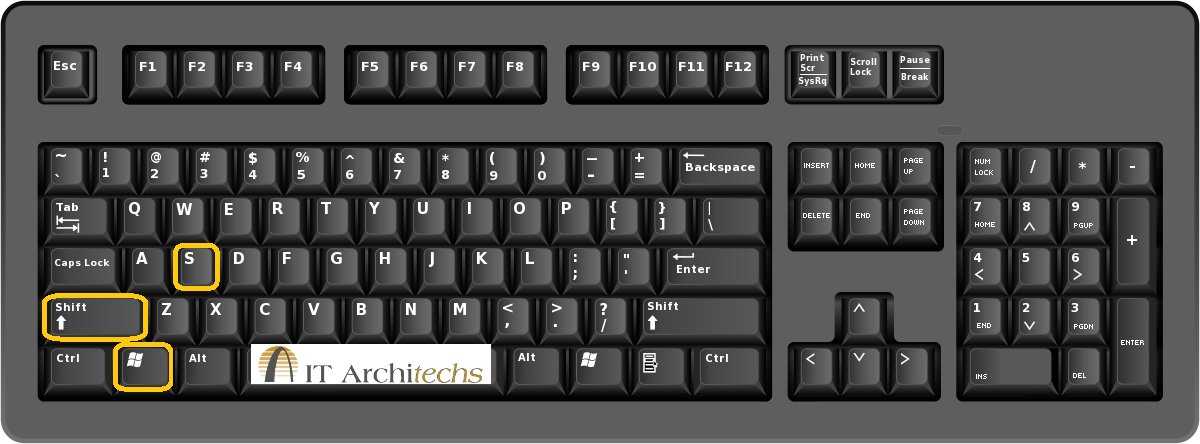
    Keyboard Tip: Need to take a screenshot of part of your screen, press Windows Key + Shift + S. A little plus sign will come up, "crop" out what you want a screenshot of, then press control + V to paste it where you want it. #Keyboardtips #ITArchitechs
    Download
    0514
  5. IT Architechs, Inc.@ITArchitechs
    Keyboard Tip: Need to take a screenshot of part of your screen, press Windows Key + Shift + S. A little plus sign will come up, "crop" out what you want a screenshot of, then press control + V to paste it where you want it. #Keyboardtips #ITArchitechs
    Download
    035
  6. IT Architechs, Inc.@ITArchitechs
    Excel / Google Docs Keyboard Tip: If you are needing to highlight an entire row , press Shift + Space. If you then decide you need more rows, click Control + Shift + Up Arrow or Down Arrow. #KeyboardTips #ITArchitechs
    Download
    0311
  7. Show more posts