Posts with #LoopTip

#LoopTip

Public posts on X that use #LoopTip.

Related hashtags

  1. Microsoft Loop✓@MicrosoftLoop
    #LoopTip: Find out everywhere that a Loop page has been shared: 1 - Click the "Shared locations" button at the top of a Loop page 2 - Browse the list of shared locations and choose any entry to open the page at where it's shared
    Download
    13212.3K
  2. Microsoft Loop✓@MicrosoftLoop
    💡#LoopTip keyboard shortcut edition ⌨️: - To add blocks: / - To @ mention someone: @ - To Undo: Press CTRL + Z at the same time - To add a line separating the page: Press - - - and space - Add bulleted list: - and a space in a new line
    54424.1K
  3. Microsoft Loop✓@MicrosoftLoop
    #LoopTip: Want to re-organize your Loop page? Just select the area you want to move, click and hold the six-dot menu, and drag it wherever you like!
    Download
    13464.6K
  4. Microsoft Loop✓@MicrosoftLoop
    #LoopTip 📄 Looking to share a Loop Page with "Read Only" access? Here's how ➡️ Click on the share or copy button at the top right of your page, then click on settings and switch from "Can edit" to "Can view".
    65385.2K
  5. Microsoft Loop✓@MicrosoftLoop
    #LoopTip: Did you know you can use "Version History" to view and restore past content? 1. Click ... at the top of a Loop page 2. Select "Version History" and pick a version 3. Click "Restore" to bring it back 4. To undo, restore the latest version from the "Version History" list
    Download
    26295K
  6. Microsoft Loop✓@MicrosoftLoop
    #LoopTip ⌨️✨ Hold CTRL + SHIFT + V to paste markdown text on any Loop page.
    05273.6K
  7. Microsoft Loop✓@MicrosoftLoop
    #LoopTip ⌨️ Streamline your workflow and pull your #MicrosoftPlanner boards into your Loop workspace without ever leaving Loop! Just type /PI ✨
    11144K
  8. Microsoft Loop✓@MicrosoftLoop
    #LoopTip ⚡️ Speed-up your table work! Press 'enter' on the last cell of a Loop table to instantly add a new row.
    2082.5K
  9. Microsoft 365 Insider✓@Msft365Insider
    #LoopTip ⚡️: Save time recapping a page with Copilot by hovering over a page on the sidebar and clicking the three-dot [...] menu to select 'Recap'
    Download
    2392K
  10. Microsoft Loop✓@MicrosoftLoop
    #LoopTip 📌 Pin a component in a @MicrosoftTeams chat to keep your discussion flowing smoothly. Easy access for everyone, as long as the chat's active! ➡️Go to "···" ➡️ Select Pin 📌
    36265.2K
  11. Microsoft Loop✓@MicrosoftLoop
    Use the / menu to add building blocks to your #Loop canvas! #LoopTip: You can even search for things in the menu by typing the name after /. For example: /code or /video 📽️ What's your favorite thing in the / menu?
    Download
    12262.6K
  12. Microsoft Loop✓@MicrosoftLoop
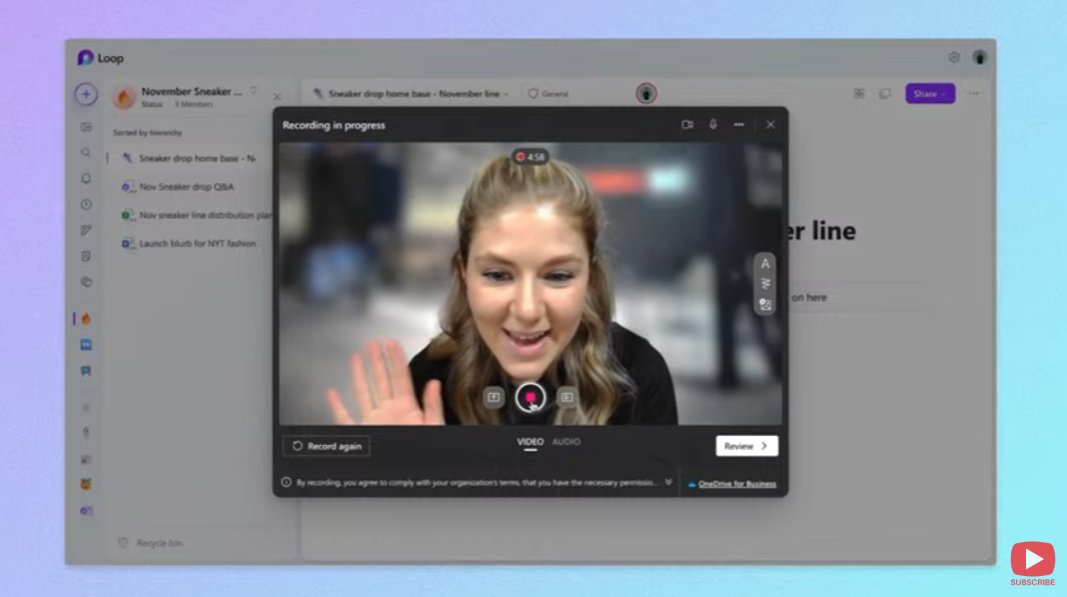
    Did you know you can record a video or audio for your coworkers directly within a Loop page? #LoopTip Check out our demo:
    Microsoft SharePoint @SharePoint
    Gerat to see @MicrosoftLoop in action. Here, adding a quick video directly to the workspace.
    01223.8K
  13. Microsoft Loop✓@MicrosoftLoop
    #LoopTip ✍️ When inserting an existing Loop component into @MicrosoftTeams or @Outlook, make sure you use the component link, not the page link, to embed the component and begin collaborating with your team.
    Download
    111456.8K
  14. Microsoft Loop✓@MicrosoftLoop
    #LoopTip 💡: Did you know that you can easily move rows and columns in a table? Simply select the desired row or column and drag and drop it to your desired location. Hope this helps!
    Download
    39514.7K
  15. Microsoft Loop✓@MicrosoftLoop
    #LoopTip 📍 Lost track of where your Loop component was shared? Click on the 'Shared Locations' button in the Loop app to see where your pages or components have traveled across your tools, making it easy to jump back to any chat, email, or whiteboard where it was sent.
    Download
    14225.1K
  16. Microsoft Loop✓@MicrosoftLoop
    #LoopTip ⚡️: Save time recapping a page with #Copilot by hovering over a page on the sidebar and clicking the three-dot [...] menu to select 'Recap' ✨
    Download
    15465.4K
  17. Microsoft Loop✓@MicrosoftLoop
    Keyboard shortcuts: expert level edition ⌨️⬇️ 💡Scroll horizontally: SHIFT + scroll 💡Add a Hyperlink: CTRL + K 💡Redo: CTRL + Y 💡Search the page: CTRL + F 💡Create a checklist: CTRL + 1 💡Create a bullet list: CTRL + - Any others we might have missed? #LoopTip
    44243K
  18. Show more posts