A chip that’s 3× faster but idle half the day isn’t 3× cheaper:
A prefill or decode device only pays off when your traffic matches the ratio you bought, and that ratio keeps changing. Your GPUs can switch roles when that happens, but specialized silicon just sits idle while you keep paying for it. Software keeps moving the bar too, since megakernels alone have pushed low-concurrency decode on ordinary GPUs up by 40–75% this year, and every one of those gains is another knock on specialized chips.
Consider: “how fast?” but “how fast, times how often it’s actually busy, after moving the KV cache over the network?” If your GPUs run at 70% and their chip averages 40% across a real year of traffic, it needs to be ~1.75× better just to tie. For a single model with very stable traffic (like a premium fast tier), that can work out, but in many case, general-purpose computing can be more useful.
Claude Code is about to make the traditional AI coding workflow look f*cking obsolete
Instead of waiting for one agent to finish 32 tasks sequentially, you can split the workload across 4 parallel workers, coordinate dependencies, and verify 24 unit tests before shipping
The crazy part is that you don't need 4 separate Claude Code sessions to build the orchestration layer
4 GitHub repos can help you build it
(1/4) Claude Code
the coding agent that plans and executes development tasks
▸
(2/4) LangGraph
coordinate parallel workers, dependencies, and shared workflow state
▸
(3/4) BullMQ
distribute jobs through Redis backed queues with retries and concurrency controls
▸
(4/4) Vitest
verify each completed unit before merging the results
▸
The real trick isn't launching more agents
It's preventing them from working on the same files, duplicating tasks, or merging broken code
Split the project into independent jobs, assign ownership, execute workers concurrently, then run a final integration test
Copy this into Claude Code:
"Analyze this repository and split the work into independent jobs, identify file ownership and dependencies, design a 4 worker execution plan, add a queue with retries, and create tests that verify each job before integration, never allow concurrent workers to modify the same files"
32 jobs → 4 workers → 24 unit tests
The video shows the architecture, not a production benchmark
Save this before building your next parallel AI coding system
watched through more than 10+ tutorials to understand goroutines and concurrency and the best explanation was in a book, i think we should go back to studying from books tbh
We invented a recursive megakernel generator called Hyperkernel, the most complete solution to megakernels and GPU efficiency.
Hyperkernel-generated megakernels achieve state of the art performance on 11 different domains: inference (DeepSeek, Kimi and GLM), pretraining (Qwen), hardware fault recovery, robotics (π₀-FAST, ACT) diffusion and real time world models (Matrix-Game), full self driving (OpenPilot), voice models (Moshi), genomics (Evo 2) and protein folding (ESMFold).
All of this in a single kernel launch.
For context, Hyperkernel generated fully optimized megakernels for robotics, genomics and voice in under 50 minutes, and doubled the efficiency for >5 models generally using only about 60-100 lines of code per megakernel. This speaks to the unparalleled standard for code quality in the automated generations.
Our first release today open sources the megakernels themselves. Over the next couple weeks, we will release the entire Hyperkernel stack, along with the complete serving stack for Kimi and GLM (20-30% inference efficiency gains across all concurrencies).
Out of the box GPU machinery performs terribly for unorthodox research. We built Hyperkernel only 20 days ago for internal use; but given its multi-modality, we have decided to open source it.
Creative research should not be bottlenecked by the lack of dedicated infra teams. Hyperkernels offer a one stop shop infra stack for all research. We would love for the open source community to add to it :)
GitHub repo:
NOTE: We primarily use NVIDIA B300s, but our kernel generation extends to other hardware (B200s, AMD, TPUs).
1/9
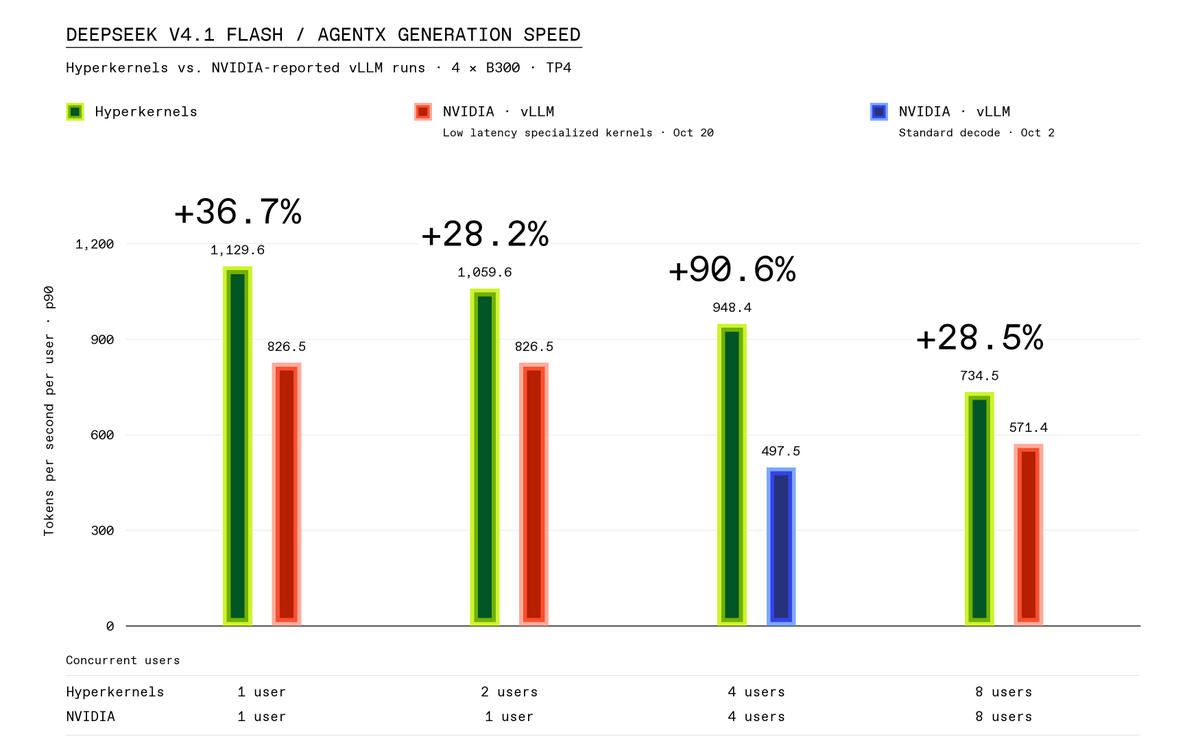
We absolutely crush NVIDIA and achieve the best low latency inference for DeepSeek v4.1 Flash.
Compared with NVIDIA’s published vLLM results, Hyperkernel delivers:
• 36.7% higher per-user generation speed at concurrency 1.
• 28.2% higher per-user speed while serving two users, versus NVIDIA serving one.
• 15% higher per user speed while serving four users, versus NVIDIA serving one.
• 90.6% higher per-user generation speed at concurrency 4, compared with the highest published C4 AgentX interactivity for TP4 B300s.
• 28.5% higher per-user generation speed at concurrency 8, compared with NVIDIA's published result.
• 36% faster median per-request decode speed.
AMD’s local inference ecosystem is starting to produce some impressive numbers.
A developer has reported 1,426 tokens/s of aggregate decode throughput running Qwen3.8-27B across four AMD Radeon AI PRO R9700 GPUs.
The entire setup runs on a single workstation reportedly costing around $18,000.
The hardware behind the result
The system uses:
4× AMD Radeon AI PRO R9700 GPUs
32GB VRAM per GPU
128GB combined VRAM
210W power limit per GPU
ASUS TRX50 SAGE motherboard
Tensor parallelism across all four GPUs
BF16 KV cache
Multi-token prediction (MTP)
The model is distributed across all four GPUs using tensor parallelism, allowing the system to handle workloads that would be difficult to accommodate on a single consumer GPU.
Qwen3.8-27B benchmark results
The developer reported two configurations:
FP8, 8 concurrent users
Prefill: 7,025 tokens/s
Decode: 813.9 tokens/s
MXFP4, 16 concurrent users
Prefill: 9,831 tokens/s
Decode: 1,426 tokens/s
The MXFP4 configuration delivers higher reported aggregate throughput while supporting twice as many concurrent users.
That makes the result particularly interesting for serving multiple local inference requests rather than just running one chat session.
Other models tested on the same workstation
The developer also shared results for two other models.
Qwen3.8-Flash-Next, 16 concurrent users
Prefill: 7,243 tokens/s
Decode: 849 tokens/s
DeepSeek V4 Flash, 4 concurrent users
Prefill: 2,268 tokens/s
Decode: 106 tokens/s
These results show how throughput varies across model architectures and configurations, even when the same four-GPU workstation is used.
Understanding the 1,426 tokens/s figure
There is an important distinction here.
The 1,426 tokens/s figure is aggregate decode throughput across 16 simultaneous users. It does not mean one person is receiving 1,426 tokens every second.
Each user receives a share of the system’s total generation capacity. Actual per-user speed depends on batching, scheduling, workload and how the requests are distributed.
Prefill and decode also measure different stages of inference. Prefill processes the input context, while decode measures the generation of new tokens.
Why this result is worth watching:
AMD’s four-GPU workstation demonstrates how much local inference capacity can be built outside the usual NVIDIA-based setups.
The next interesting question is how these results compare with NVIDIA systems under identical model configurations, concurrency levels, context lengths and inference settings.
For developers building local AI servers, the AMD ecosystem is becoming increasingly difficult to ignore.
Share
Copied
FHILY👑@Oluwaphilemon1
The same Qwen3.8-27B model, the same Three.js voxel island project, and four agents.
But two different agent configurations produced very different results.
pi
Completion time: 37.6 minutes
Tool calls: 30
Prompt tokens: ~2.5 million
omp
Completion time: 55 minutes
Tool calls: 75
Prompt tokens: ~10 million
Both configurations used the same underlying model and worked on the same voxel island task.
Yet pi finished approximately 17 minutes faster, made 60% fewer tool calls and consumed roughly 75% fewer prompt tokens.
The prompt-token difference is particularly interesting.
The pi setup used around 2.5 million prompt tokens, compared with approximately 10 million for omp. That’s a fourfold difference in input-token consumption.
This suggests that the agent harness can have a substantial effect on how efficiently a local model completes a coding task.
Why the agent configuration matters
An agent doesn’t simply send one prompt to a model and wait for code.
It repeatedly:
Reads project files.
Plans the next implementation step.
Calls tools.
Inspects outputs.
Fixes errors.
Revises its approach.
Sends additional context back to the model.
Every unnecessary tool call or repeated chunk of context adds work.
A less efficient agent can spend considerable resources revisiting information, making redundant calls or taking unnecessarily long routes to complete the same task.
A leaner agent can reduce that overhead by keeping context focused, making fewer redundant calls and managing its execution loop more efficiently.
This becomes especially important with local models, where every additional inference cycle consumes time and compute.
The hardware caveat
The developer also notes that the RTX 3090 used for the tests is unlocked.
That matters when interpreting the performance figures because GPU configuration can affect throughput.
There is another limitation: only two runs were conducted for each configuration. These results are useful as an early comparison, but they aren’t enough to establish a consistent performance advantage across different coding tasks.
What this means for local AI coding
When running a 27B model locally, upgrading the GPU isn’t the only way to improve performance.
The agent harness determines how much work the model is asked to do, how frequently it is called and how much context it processes.
In this comparison, the difference between 2.5 million and 10 million prompt tokens is a strong reminder that orchestration efficiency deserves as much attention as model throughput.
Sometimes the most practical speedup isn’t a faster GPU. It’s an agent that wastes fewer tokens and makes fewer unnecessary calls.
The same Qwen3.8-27B model, the same Three.js voxel island project, and four agents.
But two different agent configurations produced very different results.
pi
Completion time: 37.6 minutes
Tool calls: 30
Prompt tokens: ~2.5 million
omp
Completion time: 55 minutes
Tool calls: 75
Prompt tokens: ~10 million
Both configurations used the same underlying model and worked on the same voxel island task.
Yet pi finished approximately 17 minutes faster, made 60% fewer tool calls and consumed roughly 75% fewer prompt tokens.
The prompt-token difference is particularly interesting.
The pi setup used around 2.5 million prompt tokens, compared with approximately 10 million for omp. That’s a fourfold difference in input-token consumption.
This suggests that the agent harness can have a substantial effect on how efficiently a local model completes a coding task.
Why the agent configuration matters
An agent doesn’t simply send one prompt to a model and wait for code.
It repeatedly:
Reads project files.
Plans the next implementation step.
Calls tools.
Inspects outputs.
Fixes errors.
Revises its approach.
Sends additional context back to the model.
Every unnecessary tool call or repeated chunk of context adds work.
A less efficient agent can spend considerable resources revisiting information, making redundant calls or taking unnecessarily long routes to complete the same task.
A leaner agent can reduce that overhead by keeping context focused, making fewer redundant calls and managing its execution loop more efficiently.
This becomes especially important with local models, where every additional inference cycle consumes time and compute.
The hardware caveat
The developer also notes that the RTX 3090 used for the tests is unlocked.
That matters when interpreting the performance figures because GPU configuration can affect throughput.
There is another limitation: only two runs were conducted for each configuration. These results are useful as an early comparison, but they aren’t enough to establish a consistent performance advantage across different coding tasks.
What this means for local AI coding
When running a 27B model locally, upgrading the GPU isn’t the only way to improve performance.
The agent harness determines how much work the model is asked to do, how frequently it is called and how much context it processes.
In this comparison, the difference between 2.5 million and 10 million prompt tokens is a strong reminder that orchestration efficiency deserves as much attention as model throughput.
Sometimes the most practical speedup isn’t a faster GPU. It’s an agent that wastes fewer tokens and makes fewer unnecessary calls.
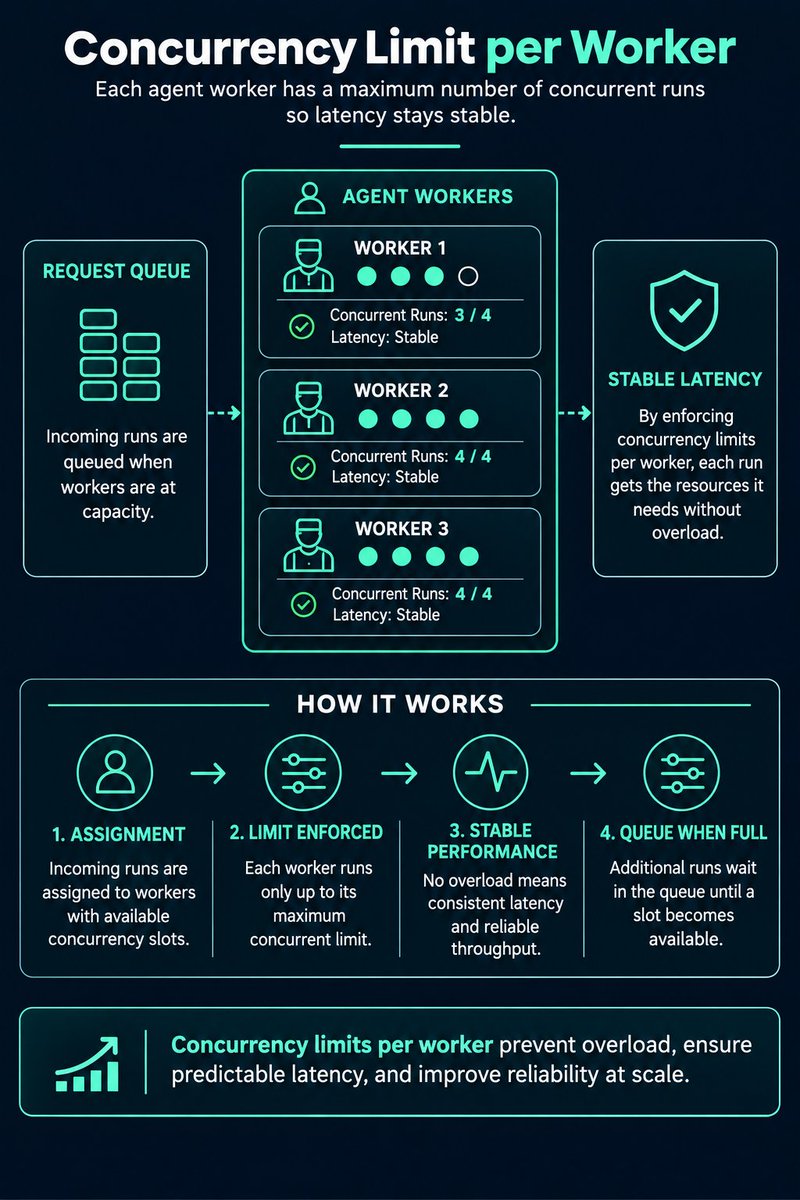
Concurrency Limit per Worker
One worker running too many agent runs at once increases latency for all of them.
As a dev, I now cap concurrency per worker.
Concurrency Cap Cheatsheet:
1. Set a max runs per worker
2. Queue excess instead of overload
3. Tune the cap from latency data
4. Different caps for different worker sizes
5. Chart runs versus p95 latency
6. Alert when workers sit at the cap
Core principle: More concurrent runs is not always more throughput.
Pro tip: Tool heavy skills need lower concurrency than pure chat skills.
What happens when one of your workers takes ten agent runs at once?
Reply below
Follow @AiCamila_ for daily production AI and DevOps patterns.
#Concurrency#Workers#AgenticAI#ProductionAI#Performance
Structured Concurrency is the next major feature from Project Loom.
This Devoxx Belgium session explains the motivation and design of structured concurrency, how to use it effectively, and the lessons learned as the feature evolved.
1 startup can fit all the compute they need inside of 1 box
3 or 4 MaxQs single fan, a liquid cooled CPU, 256gb ddr5 RAM, a mobo that supports multi pcie x16's, and about 4 tb nvme + fiber internet
Runs everything locally and can easily deal 16 to 32 concurrency
No one needs a datacenter for their specific workflow
Plus this protects data egress
CPU performance for agentic AI goes beyond traditional benchmarks.
Arm's Jeff DeFilippi spoke with @TheNextPlatform to share why latency, concurrency, and completed tasks per rack matter when evaluating infrastructure for agentic AI workloads.
🔗
i’ve been so caught up with distributed systems that i’ve lost sight of the design decisions that can be made within a single machine
- SIMD / SIMT & cpu vs gpu
- event vs thread-based concurrency
- zero-copy I/O
and more.
thinking about spending the immediate future getting into performance engineering &, more broadly, concurrency
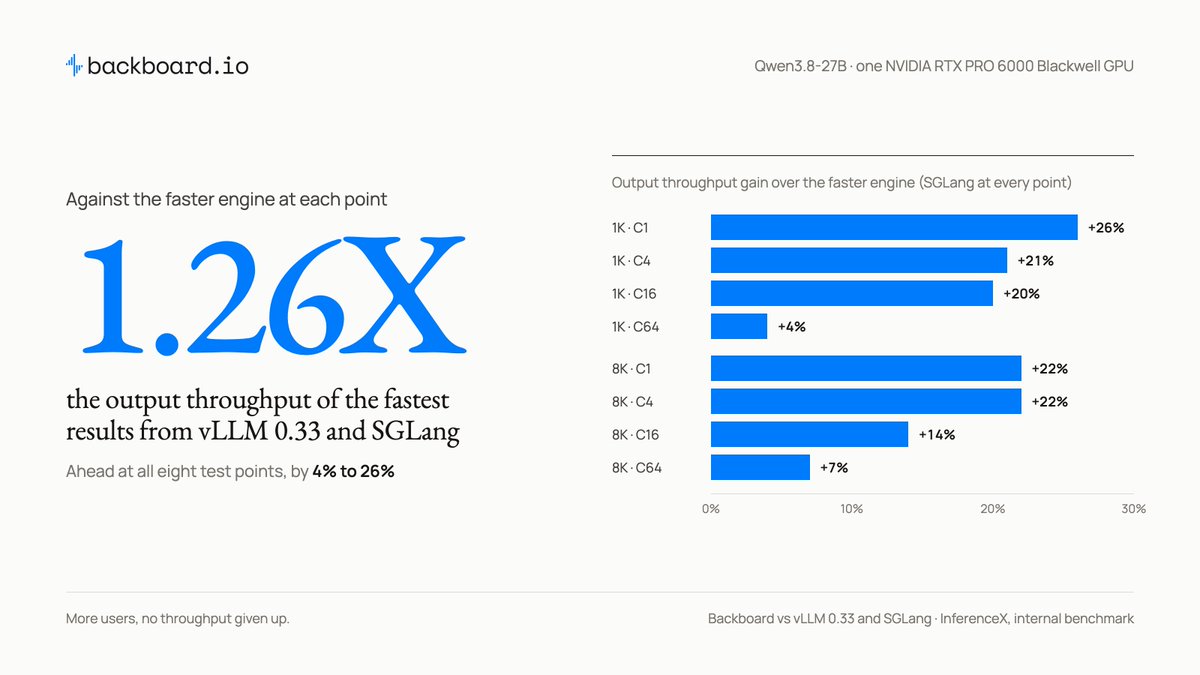
More concurrent requests shouldn't mean giving up throughput.
On Qwen3.8-27B, Backboard maintained up to a 1.26× output-throughput advantage over the fastest results from vLLM 0.33 and SGLang, with up to 8K inputs and concurrency up to 64 users.
All on a single RTX PRO 6000 Blackwell GPU.
Every backend engineer should build these 15 projects at least once.
Not another CRUD app. Projects that help you understand what's actually happening under the hood.
1. Distributed Rate Limiter — Explore token buckets, sliding windows, Redis atomicity and distributed coordination.
2. High-Concurrency HTTP Server — Understand TCP sockets, event loops, async I/O, connection handling and backpressure.
3. API Gateway — Learn reverse proxies, request routing, load balancing, authentication and circuit breakers.
4. Message Queue (Mini Kafka) — Understand producers, consumers, partitioning, acknowledgements and delivery guarantees.
5. Distributed Job Scheduler — Implement worker pools, retries, exponential backoff, delayed jobs and idempotency.
6. Distributed Cache — Explore cache eviction, TTL, cache invalidation, replication and cache stampede prevention.
7. WebSocket Server — Handle persistent connections, heartbeats, broadcasting and thousands of concurrent clients.
8. Database Connection Pool — Understand connection lifecycle, pooling, resource exhaustion, timeouts and concurrency.
9. Mini Database / Storage Engine — Implement write-ahead logging, indexing, B-trees and crash recovery.
10. Distributed Key-Value Store — Explore consistent hashing, partitioning, replication and failure detection.
11. DNS Resolver — Understand DNS records, recursive resolution, UDP/TCP, TTL and caching.
12. Concurrent Task Scheduler — Work with threads, processes, locks, synchronization and worker pools.
13. Log Aggregation System — Build log ingestion, buffering, indexing, searching and retention.
14. Change Data Capture (CDC) System — Capture database changes and explore event streaming, ordering and checkpoints.
15. CLI Process Monitor — Understand OS processes, CPU and memory monitoring, signals and resource management.
The real learning comes from building these from scratch, testing failure scenarios, benchmarking performance and understanding the trade-offs.
Which one would you add to this list? 👇
Adaptive Concurrency Control & Lock-Free Multi-Tenant Margin Ledgers for Sub-Microsecond Clearing.
In centralized derivatives clearing, executing mass concurrent market orders requires real-time adjustments to available balances and leverage across thousands of accounts. Protecting shared ledgers with traditional mutex locks induces severe thread contention and latency avalanches.
ORBIT PERP deploys a lock-free multi-tenant margin ledger driven by hardware-native Atomic Compare-And-Swap (CAS) primitives and adaptive concurrency control.
🛠️ Lock-Free Ledger Architecture Highlights:
🔹 Hardware-Native Atomic CAS Deductions: Margin balance and position quantity deductions are refactored into single hardware atomic instructions (`__atomic_compare_exchange_n`), enforcing thread-safe mutations without thread parking.
🔹 Adaptive Concurrency Retry Loops: Managing concurrent mutations on shared account states via microsecond optimistic rollback loops, completely eliminating deadlock vectors.
🔹 Cache-Line Aligned Multi-Tenant Slots: Account clearing state structures are strictly aligned to 64-byte physical boundaries, preventing cache line thrashing and false sharing during parallel core updates.
🔹 Atomic Margin Verification Coupling: Maintenance margin (MMR) boundary checks execute within the same clock cycle as atomic ledger deductions, fusing risk validation and clearing mutations sub-microscopically.
Reinventing multi-tenant margin ledgers through hardware CAS operations to eliminate lock contention and achieve sub-microsecond position state mutations.
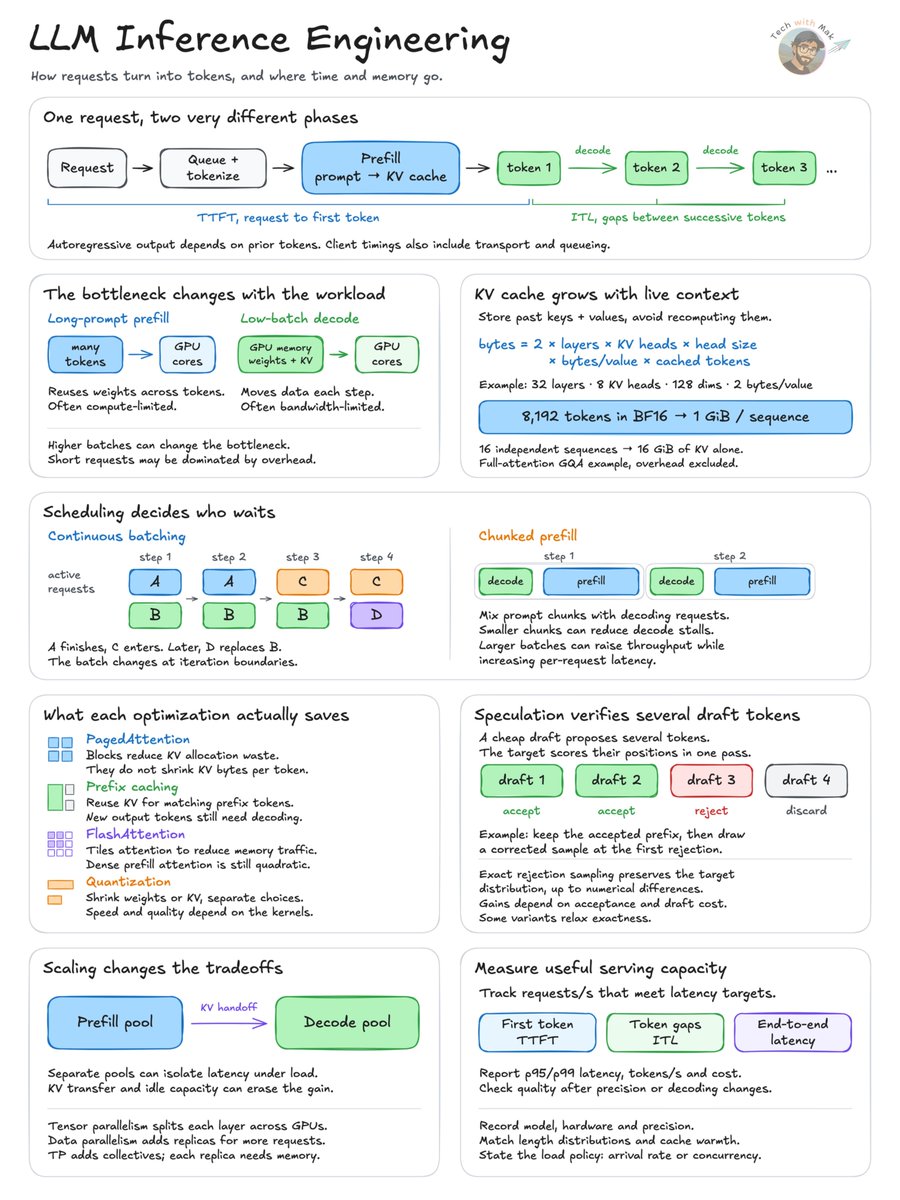
LLM inference can switch from compute-bound to memory-bound during a single request.
The same model, running on the same GPU, can encounter very different performance limits as it moves from processing the prompt to generating output tokens.
During prefill, the model processes the input tokens in parallel and builds the KV cache. Long-prompt prefill is often compute-limited because of the large matrix operations involved.
Decode behaves differently. Tokens are generated autoregressively, and each step reuses model weights and accesses the growing KV cache. At low batch sizes, memory bandwidth often becomes the bottleneck.
This distinction affects almost every decision in an inference serving system.
Consider a full-attention GQA model with 32 layers, 8 KV heads and a head dimension of 128, using BF16 for its KV cache. An 8,192-token sequence requires 1 GiB of KV cache. Sixteen independent sequences require 16 GiB without cross-request sharing, before accounting for model weights, activations and runtime overhead.
The problem becomes one of scheduling computation while managing a limited amount of GPU memory.
Continuous batching allows requests to enter and leave the active batch between iterations. Chunked prefill divides long prompts into smaller units that can share execution with decoding requests, helping control inter-token latency.
PagedAttention manages KV storage in blocks to reduce allocation waste. Prefix caching can share previously computed KV blocks across requests with matching prefixes. Neither reduces the size of an individual KV entry for a fixed model and precision.
Other optimizations address different costs.
FlashAttention reduces memory traffic during attention computation. Speculative decoding verifies proposed tokens with the target model, reducing sequential target-model decoding work when proposal and verification costs are favorable. Proposals may come from a smaller draft model, auxiliary prediction heads or other methods.
At larger scales, prefill and decode can even run on separate GPU pools. This can reduce interference between the two workloads, although KV transfers and resource utilization introduce additional costs.
The important measurements are therefore more than tokens per second.
Time to first token, inter-token latency, tail latency, KV-cache utilization, throughput and cost all need to be measured under realistic prompt lengths, output lengths and request concurrency.
A serving configuration that maximizes raw throughput may perform poorly when individual requests have strict latency requirements.
The engineering objective is to serve as many requests as possible while meeting those requirements, without exhausting memory or compromising output quality.