How to search X (Twitter) posts without logging in
Searching X used to be something anyone could do from a browser. Now x.com usually asks you to sign in before it shows search results. You can still search public posts without an account. This guide shows how, explains the difference between Top and Latest, and covers the tips that make searches more useful.
Short answer: type a word, a #hashtag or a username into the search box below and press Search. You’ll get matching public posts from X, which you can sort by Top or Latest. No account, no login.
Enter a @username or paste an X link to open it, or any word or #hashtag to search posts.
Why x.com wants you to log in first
X limits what logged-out visitors can do, and search is one of the first things it puts behind its sign-in screen. The posts you’re looking for are still public. X just wants you to have an account before it searches them for you.
Lurkbird runs the search on its own servers and shows you the public results on a normal web page. You don’t sign in, so your search isn’t tied to an X account.
How to search X posts on Lurkbird
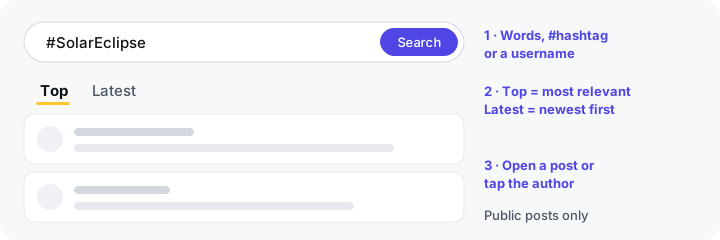
- Type your search. Use the search box at the top or bottom of this page, or the one on the Lurkbird home page. You can search for any word or phrase, a #hashtag such as
#SolarEclipse, or a username. - Choose Top or Latest. Top shows the posts X ranks as most relevant, which are usually the ones with the most attention. Latest shows matching posts newest first, so it’s the one to use for breaking news, live events or anything happening right now.
- Open what you find. Scroll down and press Show more posts to load more results. Open a post to read it on its own, tap the author to see their profile, or tap another #hashtag to start a new search.
Results come from X’s own search. Lurkbird keeps a copy for a few minutes so pages load quickly, so a post published a moment ago may not show up straight away.
Tips for better results
Most searches work best when they’re short and specific. A few habits help a lot:
- Use the words people would actually post. Search for
eclipserather thaninformation about the solar eclipse. Posts are short and casual, and a long query matches fewer of them. - Try the hashtag and the plain word.
#SolarEclipseandsolar eclipsereturn different posts, because not everyone uses the hashtag. - Switch between Top and Latest. If Top feels stale, Latest will show you the conversation as it is right now. If Latest is noisy, Top filters it down to posts that got attention.
- Search in the right language. X matches the words you type, so a search in English won’t find posts written in Spanish or Japanese. Try the term in the language you’re interested in.
- Start from a trend. If you don’t know what to search for, the trends page lists what’s trending worldwide and in a list of countries. Tapping a trend searches it for you. Our guide to X trends by country explains how trends work.
Search tips that work in the Lurkbird search box
X's search understands a few special words, called operators. We tested these in the Lurkbird search box on the Latest tab, and you can combine them.
| Operator | What it does | Example |
|---|---|---|
"exact phrase" | Only posts that contain those words in that order | "solar eclipse" |
-word | Leaves out posts that contain the word | eclipse -glasses |
OR | Posts that contain either word | eclipse OR totality |
from:username | Only posts written by that account | from:nasa moon |
to:username | Replies sent to that account | to:nasa |
since:YYYY-MM-DD | Posts from that date onward | eclipse since:2026-01-01 |
lang:xx | Posts in one language (two-letter code) | eclipse lang:es |
filter:media | Only posts with photos or videos | eclipse filter:media |
min_faves:N | Only posts with at least N likes | eclipse min_faves:1000 |
What search can’t do
Being clear about the limits saves time:
- No posts from protected accounts. If an account is private, its posts never appear in search results, on Lurkbird or for anyone outside its approved followers.
- Not every post ever written. X decides what its search returns, and it doesn’t index every post. Older posts can be hard to find, and deleted posts are gone. Lurkbird shows what X’s search returns, except accounts whose owners have asked us to hide them.
- No direct messages and no likes. Messages are private, and X made likes private in 2024, so neither can be searched.
- No personal feed. Without an account there’s no “For you” timeline. Search, profiles and trends are how you find things.
Other ways to search X without an account
- Google. A search such as
solar eclipse site:x.comfinds some X posts and profiles that Google has indexed. Coverage is patchy, and results can be days or weeks old, so it’s better for well-known posts than for anything recent. - Embedded posts on news sites. Articles about a big event often embed the key posts. That’s handy for context, but it isn’t a search.
- An X account. Signing up gets you X’s full search, including its advanced search form. Anything you do while logged in, such as liking or following, is visible to others. Our guide to browsing X anonymously covers what shows and what doesn’t.
Is searching on Lurkbird private?
Your searches aren’t shown to anyone on X, and the people whose posts appear in your results aren’t told. Your X account isn’t involved at all. Like any website, Lurkbird’s servers still see your IP address, and we use Google Analytics to count visits. The anonymity guide and our privacy policy have the details.
Frequently asked questions
- Can I search X without an account?
- Yes. Type words, a #hashtag or a username into Lurkbird's search box to see matching public posts. You don't need an X account or any sign-up.
- What's the difference between Top and Latest?
- Top shows the posts X ranks as most relevant to your search, which are often the most popular ones. Latest shows every matching post X returns, newest first. Use Latest to follow something as it happens.
- Why can't I find a post I know exists?
- It may come from a protected account, it may have been deleted, or X's search may not include it. X doesn't index every post, especially older ones. Very new posts can also take a few minutes to appear.
- How do I see everything one person has posted?
- Open their profile on Lurkbird. It lists their public posts newest first, and you can keep scrolling for older ones.
- Can the people whose posts I find see that I searched?
- No. Searching on Lurkbird doesn't involve your X account, and nobody is told what you searched for.
Start searching
Type a word, #hashtag or username below to search public posts on X, no login needed.
Enter a @username or paste an X link to open it, or any word or #hashtag to search posts.