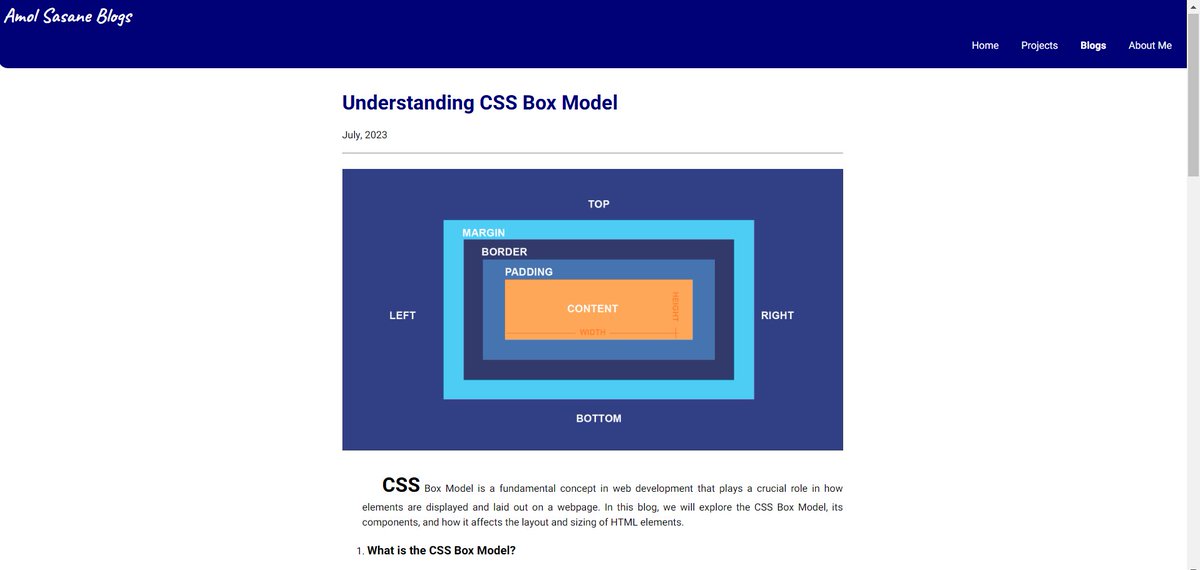
CSS Box Model Explained!⭐️
Many learning fellows get confused about CSS box model while it's so easy to understand.
My new blog explains the CSS Box Model in simple terms🗒️
Check it out now and level up your CSS game!🚀
Blog Link:
#cssboxmodel#webdev
Day 05/100: The #CSSBoxModel
Today, I learnt about most of the fundamentals CSS Properties related to #BoxModel. Like…
1. Width & Height
2. Border & Border-Radius
3. Padding
4. Margin
5. Display Property
#100DaysOfCode#WebDev#CSS
CSS Box Model Quiz! 📦
Web Developers, test your CSS knowledge!
What property defines the space between an element’s border and its content?
A) Margin
B) Padding
C) Border
Comment your answers below! 🖊️ No peeking online! 🚫 #CSSBoxModel#StyleQuiz#WebDevSkills#html#css#javascript
Today was Day 12 of the #100DaysOfCode challenge, and I spent it mastering the box model and how to manipulate it with CSS. By using borders, margins, and padding, I can create visually appealing designs that are both functional and user-friendly. #cssboxmodel#webdevelopment
Hello and welcome to the Ninth Episode of CSS for Beginners Series.👋
In this video I discuss the CSS Box Model concept. The box model defines how different parts of a box – content, padding, border and margin – work.💡👨💻
#CSSBoxModel#CSS#CSS3
🚀 Day 8 in Web Dev! 💻✨
CSS Box Model mastery unlocked:
1️⃣ Margin: Outer space for elements.
2️⃣ Border: Elegant boundaries, adding flair.
3️⃣ Padding: Inner comfort zones, space between content and border.
Ready to design captivating layouts! 💬📐 #WebDevJourney#CSSBoxModel
Hello learners,
#Day 8⃣
Today session is, Introduction to cascading style sheet box model and background-image, height and width px. It's a exciting session for me. Thank you Nxtwave CCBP 4.0 academy
#cssboxmodel#Nxtwave#CCBP 4.0
#CSSstyling#heightandwidth#Thankyou