HTML Tips for Clean Markup
Write HTML like a pro! Here are 7 tips to improve your markup game. 💻🧵 #HTML#FrontendTips
A Thread:
1/ Use semantic tags: <header>, <main>, <article> — they improve accessibility & SEO.
2/ Don’t skip heading levels. Use <h1> to <h6> in order.
#FrontendTips
If you develop a mobile website, you might encounter this issue in Safari where the browser automatically zooms the page when you try to focus on an <input> on iPhone.
To fix this, ensure the font-size of that <input> is at least 16px.
> ⚠️ Don’t use <br> for spacing elements
❌ <br><br><br>
✅ Use CSS margins instead:
.element { margin-bottom: 2rem; }
It keeps your HTML clean & professional.
#HTML#FrontendTips
Confused between localStorage, sessionStorage, & cookies? 🤔
🔹 Key differences
🔹 Pros & cons
🔹 When to use what
🔹 Security tips devs must know
Bonus: IndexedDB for power users!
📖 Read more:
#WebDev#JavaScript#FrontendTips
SSR vs CSR – Which one drives your site faster?
SSR = Instant load, consistent UX 💡
CSR = Speedy navigation, lighter backend 💻
Master the right rendering approach for performance & growth!
👉 Follow us @growthanchors#WebDev#SSRvsCSR#FrontendTips#JavaScript#DevCommunity
Mucha gente me pregunta como genero mis logos como components en React ...
...🤫nadie me ha preguntado realmente 😆 pero si por si te puede servir para ahorrarte un dinerillo te lo dejo por aqui 🧵👇:
#ui#FrontEndTips#react
1. Genero el logo usando DALL·E 3 desde ChatGPT
React Pro Tip:
Memoize expensive components with React.memo to skip re-renders if props are shallow-equal.
const MemoItem = React.memo(Item);
#ReactJS#WebDev#FrontendTips
¿Conoces la nueva directiva use cache de Next.js?
Te explico cómo usarla para mejorar la performance de tu app, sus pros y contras.
📺 Mira el video completo 👉
#NextJS#useCache#FrontendTips#React
3 things that instantly level up any website:
✅ Good font pairing
✅ Smooth scroll behavior
✅ Buttons with hover that actually feel good
💡 Design is the dev’s secret weapon.
#FrontendTips#UIDesign#WebDev
#FrontendTips:
Al hacer una petición a la API tiene que haber un Loading siempre, por más que en local la petición sea muy rápida.
Emular Internet lento: Inspeccionar/Consola - Network y en el select "No throttling" seleccionar la opción "Slow 3G" y probar el flujo.
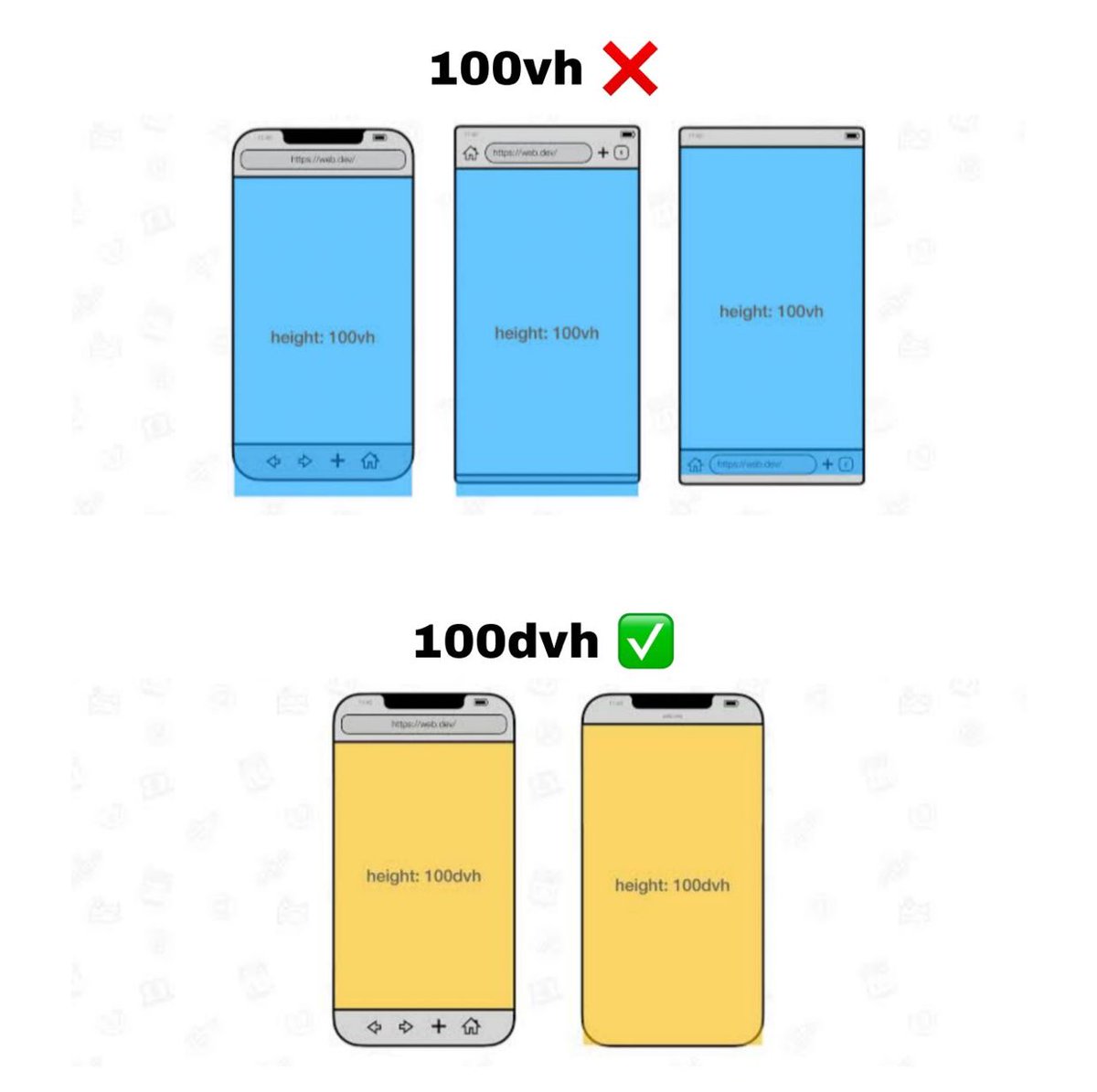
Still using 100vh in your CSS? You might be breaking mobile layouts
❌ 100vh ignores the mobile address bar, leads to cut-off content & scroll issues.
✅ Use 100dvh instead It respects the actual visible height.
Small fix, big difference
#CSS#WebDev#FrontendTips#MobileUX
Did you know you can use clamp() in CSS to make responsive typography super easy? 🤯
clamp() allows you to set a responsive value that adapts between a minimum, preferred, and maximum range.
No more media queries for every screen size! #CSS#WebDev#FrontendTips