Posts with #TerminalTips

#TerminalTips

Public posts on X that use #TerminalTips.

Related hashtags

  1. Matthew (he/him) ❤️@MaximumGilliard
    @MaximumGilliard
    It's time I shared one of my all-time favourite #TerminalTips If you need to type a really long command (or edit one from your history or have copied and pasted), ctrl-x-e will open it in an editor! How cool is that?? Save + quit to be back on the command line.
    Download
    41746
  2. Matthew (he/him) ❤️@MaximumGilliard
    My two homes when I'm coding #Java are the IDE and the terminal. I'm going to share tips I've learned for working in those places, in a couple of threads. I always want to learn more, so jump in with your own suggestions please! Terminal tips from here, IDEs from there 👇
    Matthew (he/him) ❤️ @MaximumGilliard
    Extracting and inlining a variable in @intellijidea - two of my absolute fave shortcuts
    3214
  3. Matthew (he/him) ❤️@MaximumGilliard
    @MaximumGilliard
    A few tweets of #TerminalTips for moving around and editing text. ctrl-a - move to start of line crtl-e - move to end of line alt-b - back word alt-f - forward word ctrl-d - delete char alt-d - delete word ctrl-k - delete to end of line ctrl-u - delete whole word ctrl-/ - UNDO!
    Download
    203
  4. @ardalis.com on BlueSky@ardalis
    As CLI tools become more and more popular, it's not unusual that I find I have more than one command, bash, or PowerShell window open, and it can be nice to be able to give each window a name that makes sense. #CommandLine #PowerShell #TerminalTips
    43202.9K
  5. EverythingDevOps@evrythingdevops
    POST UPDATE😀 You have a Linux Operation System or Server running and still not familiar with background and foreground jobs or task, then this is for you. Learn to efficiently manage foreground and background processes in Linux. Discover how to: #Linux #DevOps #TerminalTips
    113207
  6. oli@joaoolioliveira
    @joaoolioliveira
    Day 5 - Terminal Fun facts: 1) If you type / inside a man in the terminal you can search for specific characters. 2) The command ls -F -a is equivalent to ls -Fa What's your favorite terminal command? Comment below! #TheOdinProject #100DaysOfCode
    103134
  7. prod42net@prod42net
    Learn how to supercharge your Zsh with Oh My Zsh, zsh-autosuggestions, and zsh-syntax-highlighting plugins. Follow Dario Simpson's guide for a seamless installation and enhanced terminal experience. #Zsh #OhMyZsh #TerminalTips
    0261.8K
  8. Ace✓@HackermanAce
    Wanted to put something simple out for people to reference. So you too can learn to become a Dom Trader but first you need to understand what you are looking at.
    Download
    28183K
  9. Ace✓@HackermanAce
    @HackermanAce
    As you can see there is a left side and a right, the Depth of the bid side and Depth of the ask side hence the name of the tool Depth Of Market panel (DOM). #terminaltips
    Download
    103121
  10. Hack4u@Hack4uAcademy
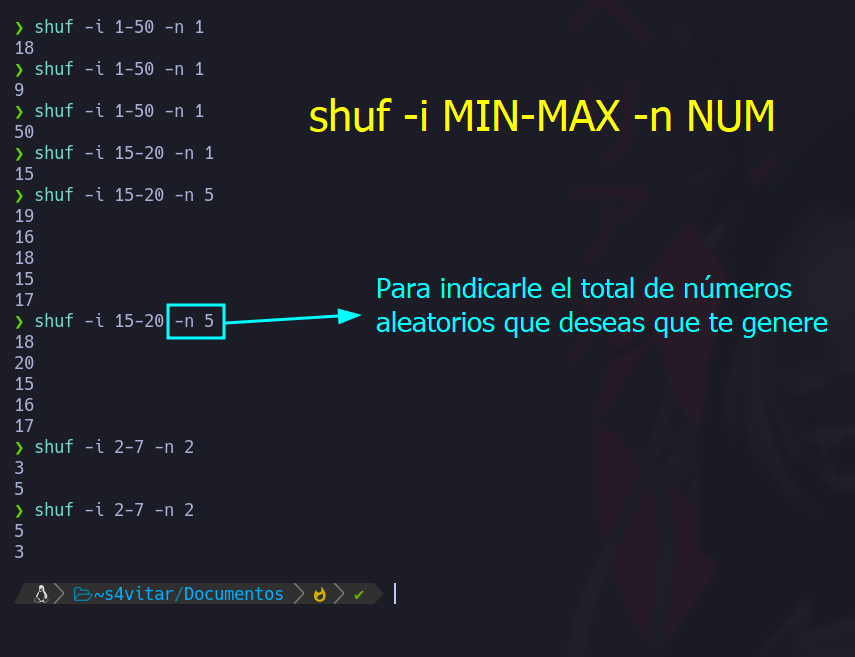
    ¿Sabías que en #Linux puedes usar el comando nativo 'shuf' para generar un número aleatorio en un rango específico? 🎲🔢 Reemplaza MIN y MAX con los límites deseados. ¡Juega con la suerte en la terminal! 🌟 #Bash #TerminalTips 🃏✨
    Download
    03562.4K
  11. Show more posts