How to view an X (Twitter) profile without an account
X (formerly Twitter) now shows most logged-out visitors a sign-in prompt before they can scroll through a profile. If all you want is to read someone’s public posts, you don’t need to create an account for that. This guide shows the quickest way, what you can and can’t see, and the other options with their trade-offs.
Short answer: type the username into the search box below and open the profile. You’ll see the account’s public posts, photos and videos without signing in. Protected (private) accounts can’t be viewed this way, on Lurkbird or anywhere else, unless the owner has approved you as a follower on X.
Enter a @username or paste an X link to open it, or any word or #hashtag to search posts.
Why x.com asks you to log in
When you open a profile on x.com without being signed in, X usually shows a limited view. Posts may not be in date order, and a sign-in box appears after a few scrolls or as soon as you tap anything. That’s a business decision by X: it wants visitors to make an account.
The posts themselves are still public. Their authors chose to share them with everyone, which is why other services can show them. Lurkbird fetches public profiles and posts on its own servers and shows them to you on a normal web page, with no sign-in step.
How to view a profile on Lurkbird
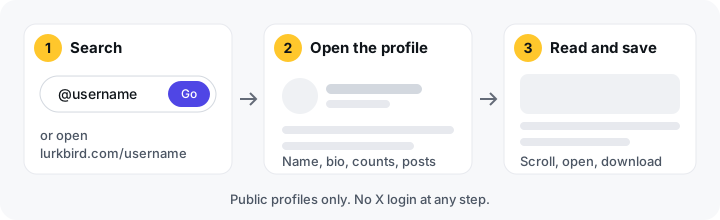
- Search for the account. Type the person’s username into the search box at the top of this page, with or without the @. If you already know the exact username, you can skip the search and go straight to
lurkbird.com/username. For example,lurkbird.com/nasaopens NASA’s account. - Open the profile. You’ll see the profile header (name, bio, follower and following counts) and the account’s most recent public posts, newest first. Photos and videos show up right in the feed.
- Read, explore and save. Scroll down to load older posts. Open a post to read it on its own, tap a #hashtag to see what else people are posting about it, or download a photo or video you have the right to keep.
That’s all there is to it. There’s no account to create and no email address to confirm, and nothing gets installed.
What you can and can’t see
| You can see | You can’t see |
|---|---|
| Public posts and reposts | Posts from protected (private) accounts |
| Photos, videos and GIFs in public posts | Suspended or deactivated accounts |
| Name, bio, profile picture and follower counts | Direct messages |
| Hashtags and links in posts | Which posts someone has liked (X made likes private in 2024) |
| Posts that have been deleted |
Lurkbird fetches a profile from X when someone asks for it and keeps a copy for a few minutes so pages load quickly. A post published seconds ago can take a little while to appear. If a post was just deleted on X, it may stay visible here for a few minutes until our copy refreshes. After that it’s gone, because Lurkbird isn’t an archive.
Other ways to view a profile without an account
Lurkbird isn’t the only option, and depending on what you need, one of these may be enough:
- Open the profile on x.com anyway. For a quick look at a well-known account, x.com sometimes shows enough before the sign-in prompt appears. It’s unreliable for reading more than a handful of posts.
- Search Google. Searching for the person’s name followed by
site:x.comoften finds their profile and some individual posts. Google only indexes part of what’s on X, and its copy can be days or weeks old. - Look for embedded posts. News sites and blogs often embed individual posts. That’s fine for one post, but you won’t get the whole profile.
- Nitter. Nitter was a popular open-source front end for reading X. Most public Nitter sites stopped working in early 2024 after X shut down the access they depended on. A few still run on and off, so they’re hard to rely on.
- Make an X account. It works, but X asks for an email or phone number. Anything you then do while logged in (a like, a follow, a reply) is visible to others. Our guide to browsing X anonymously covers what does and doesn’t show.
Will they know you looked?
No. X has no “who viewed your profile” feature, so nobody gets a list of visitors. Lurkbird doesn’t tell account owners who looked them up. Since you never sign in here, your X account isn’t part of the visit at all.
That doesn’t make you invisible on the internet. Like every website, our servers see your IP address, and your network provider can see that you visited lurkbird.com. The anonymity guide explains exactly what is and isn’t private.
Tips for following accounts without an account
- Bookmark the profile. Save
lurkbird.com/usernamein your browser for accounts you check often. It works like a follow, without anyone being told. - Search inside a topic. To find what someone said about a subject, our guide to searching X without logging in shows how to search public posts by word, #hashtag or username.
- See what’s happening. The trends page shows what’s trending worldwide and in a list of countries, and you can open any trend in one tap. See X trends by country for how it works.
If the account you want is protected, the only honest route is to ask the owner to approve you as a follower on X. No tool can get around that, and you should be wary of any that claims to.
Frequently asked questions
- Can I view an X profile without an account?
- Yes, if the profile is public. Type the username into Lurkbird's search box or go to lurkbird.com/username to read the account's public posts, photos and videos without signing in to anything.
- Can I see a private (protected) X account without following it?
- No. Posts from protected accounts are only visible to followers the owner has approved on X. Lurkbird never shows them, and any site that claims it can is not telling the truth.
- Why does X keep asking me to sign in?
- X shows most logged-out visitors a sign-in prompt and only a limited view of profiles. That's X's choice for its own site. Viewers like Lurkbird fetch the public posts on their own servers and show them to you without a login.
- Will the person know I viewed their profile?
- No. X doesn't tell people who viewed their profile, and Lurkbird doesn't either. Because you never sign in, your X account isn't involved at all.
- Why can't I find an account on Lurkbird?
- The username may have changed, or the account may be protected, suspended or deactivated. Lurkbird also hides accounts whose owners have asked us to remove them.
- Is it free?
- Yes. There's no account to create, no paid plan and no ads.
Look up a profile now
Type a username below to open a public X profile on Lurkbird, or go back to the Lurkbird home page to browse trends.
Enter a @username or paste an X link to open it, or any word or #hashtag to search posts.