How to download X (Twitter) videos and GIFs as MP4
X doesn’t give most people a button to save a video from someone else’s post, and the app usually asks you to sign in before you can even watch. If the post is public, you can save its video or GIF as an ordinary MP4 file without an account. This guide shows how on a phone or a computer, what quality to expect, and what’s fair to do with the file.
Short answer: find the post on Lurkbird, press Download under the video, and save the MP4. It works for videos and GIFs in public posts. It doesn’t work for private accounts.
Enter a @username or paste an X link to open it, or any word or #hashtag to search posts.
Before you download: what’s fair
A public post means anyone can watch it. It doesn’t mean anyone can reuse it. The person who filmed or edited the video usually owns it.
- Keeping a copy to watch later is the most common reason to download, and the least likely to cause anyone a problem.
- Re-uploading someone else’s video, putting it in your own content or using it commercially needs the creator’s permission. Ask them, and credit them.
- If you’re a creator and your video is on Lurkbird without your permission, our DMCA page explains how to reach us.
How to download a video from X
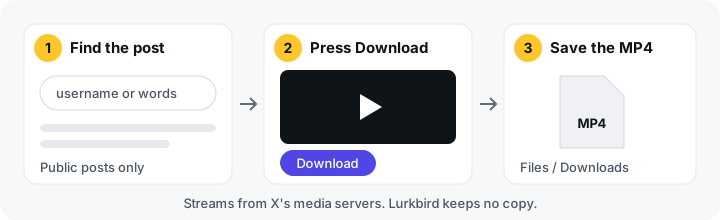
- Find the post on Lurkbird. Use the search box on this page. Search for the account’s username to open their profile and scroll to the post, or search for a few words or a #hashtag from the post (search tips here). Lurkbird doesn’t have a box where you paste a post link, so searching is how you get to the post.
- Press Download. A public post with a video, GIF or photo has one Download button under its media. There’s nothing to choose: Lurkbird picks the file for you (see quality below).
- Save the file. Your browser downloads the file: an MP4 for videos and GIFs, an image for photos. Where it ends up depends on your device. See below.
The file streams from X’s media servers through Lurkbird straight to you. We don’t keep a copy, and there’s nothing to install.
One file per post. The Download button saves one item: the post’s first photo, or its video or GIF if there are no photos. If a post has several photos, open each photo on Lurkbird (it opens full size in a new tab) and save it from your browser.
Saving on iPhone, Android and computers
iPhone and iPad (Safari). When you press Download, Safari asks whether you want to download the file. Tap Download. The video goes to the Downloads folder in the Files app, not to Photos. To move it into Photos, open the Files app, find the video, tap the share button and choose Save Video.
Android (Chrome and most other browsers). The video saves to your Downloads folder. Most gallery apps show it in a “Download” album. If yours doesn’t, open the Files app and look under Downloads.
Windows, Mac and Linux. The MP4 lands in your Downloads folder unless your browser asks where to save it. It plays in any modern video player.
What quality to expect
X stores each video in a small number of sizes, chosen when the video was uploaded. You can only get a version that X has. Lurkbird doesn’t upscale or re-encode anything, so a video can’t come out sharper than the original upload. Older videos and videos recorded on low-end phones are often small.
There’s no size menu. Of the MP4 versions X offers for a video, Lurkbird always gives you the one with the highest bitrate, which is normally the largest and sharpest. How good that is depends entirely on what was uploaded. If you want a smaller file to save space, compress it afterwards with any video app.
GIFs come out as MP4
GIFs on X aren’t really GIF files. X turns every uploaded GIF into a short, silent MP4 video, because MP4 files are much smaller. When you download a GIF from Lurkbird you get that same MP4 file, exactly as X stores it, and it plays in any video player.
If you really need a .gif file, for example for a chat app that only accepts GIFs, any video-to-GIF converter can make one from the MP4. Expect the GIF to be several times larger.
Why a download might not work
- The account is protected. Lurkbird never shows posts from private accounts, so there’s nothing to download.
- The post was deleted. If the post is gone from X, the video is too.
- The video was withheld. X sometimes removes media after a copyright report, or hides it in certain countries. Lurkbird doesn’t get around those decisions.
- It’s a live broadcast. Some live videos and broadcast replays aren’t stored as a normal video file, so they can’t be downloaded as MP4.
- The video is still processing. Videos posted seconds ago are sometimes not ready yet. Wait a minute and try again.
Other ways to save X videos
- X’s own app. X lets some paid subscribers download certain videos inside its app, where the person who posted them allows it.
- Screen recording. Your phone or computer can record the screen while the video plays. Quality is lower, and you’ll capture anything else on screen, including notifications.
- Other downloader sites. There are many. Some are fine; others are covered in ads, open pop-ups or push you to install a browser extension. Don’t install anything to download a video.
- Ask the creator. For anything you want to reuse, asking for the original file gets you the best quality and the permission you need.
If you want to save videos without signing in to X at all, our guide to browsing X anonymously explains what Lurkbird can and can’t see. To find popular videos in the first place, start from the trends page.
Frequently asked questions
- Is it legal to download videos from X?
- It depends on where you live and what you do with the file. Saving a public video to watch yourself is very different from re-uploading someone else's work. Videos belong to the people who made them, so ask before you repost or reuse one. This isn't legal advice.
- Can I download videos from private accounts?
- No. Lurkbird only shows public posts, so videos from protected accounts can't be viewed or downloaded here.
- What quality will the video be?
- Lurkbird gives you the highest-bitrate MP4 that X stores for that video. There's no size menu. Lurkbird doesn't upscale or re-encode videos, so the file can't be sharper than the original upload.
- Why did my GIF download as an MP4?
- X stores GIFs as short MP4 videos, so the file you save is an MP4 too. It plays in any video player. If you need an actual .gif file, a video-to-GIF converter can make one.
- Does Lurkbird keep a copy of the videos I download?
- No. The file streams from X's media servers through Lurkbird straight to your device, and we never store it.
Find a video to save
Search for the account or a few words from the post below, or browse what’s popular on the Lurkbird home page.
Enter a @username or paste an X link to open it, or any word or #hashtag to search posts.